Can You Connect RCA To HDMI With These Simple Steps
You can connect RCA to HDMI using a simple audio video converter or adapter. This guide shows you exactly how to make the RCA to HDMI connection work seamlessly with your older devices and modern TVs. Learn which adapters to buy, how to set them up, and how to avoid common mistakes that cause signal problems.
Have you ever looked at your old DVD player, VCR, or retro gaming console and wondered how to hook it up to your new flat screen? You are not alone. Many people face the same challenge every day. The problem is simple. Older devices use RCA cables while modern TVs rely on HDMI connection standards. These two technologies do not plug directly into each other. But here is the good news. You can bridge that gap with the right tools and a little patience.
Can you connect RCA to HDMI? The answer is a definite yes. With an audio video converter, you can take the analog signal from your old gear and turn it into a digital HDMI signal that your modern TV can read. This guide walks you through every single step. You will learn what equipment you need, how to set things up, and how to troubleshoot common issues. By the end, you will feel confident making this RCA to HDMI connection on your own.
Whether you want to bring back an old game console, set up a vintage stereo system, or connect a legacy cable box, this guide has you covered. Let us dive in and make your older devices work with your modern TVs. No complicated jargon. No confusing tech speak. Just clear, simple steps that actually work.
Key Takeaways
- You need a converter: RCA and HDMI use different signal types, so an AV to HDMI converter is essential for making them work together.
- Composite and component cables are both RCA: Understanding the difference helps you choose the right adapter for your setup.
- Signal quality matters: Using a cheap or damaged converter can lead to signal degradation and poor video quality.
- Setup is simple: With the right equipment, connecting RCA to HDMI takes just a few minutes and no technical skills.
- Check your display settings: Modern TVs may need specific display settings adjusted to recognize the RCA to HDMI adapter properly.
- Upgrade when possible: If your devices support it, moving to full HDMI provides the best cable connection and resolution support.
- Older devices still work: You can still use vintage equipment with modern screens using the right cable compatibility tools.
📑 Table of Contents
What Are RCA and HDMI Cables?
Before you grab any adapter, it helps to understand what these two cable types actually are. Knowing the basics saves you time and money. It also prevents you from buying the wrong equipment.
Understanding RCA Cables
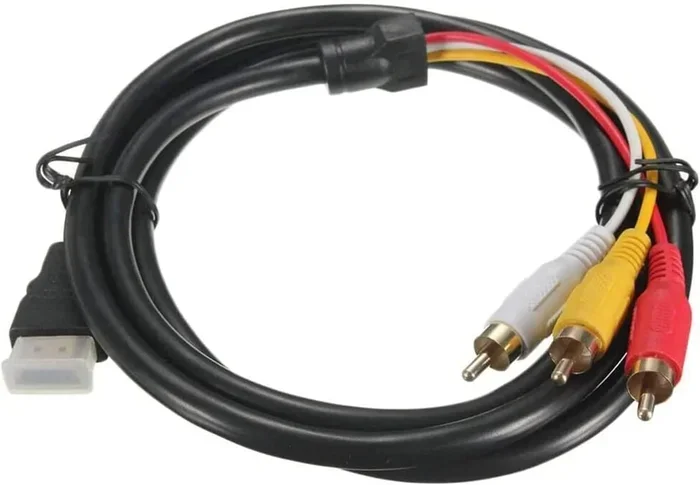
RCA cables have been around since the 1940s. They are the classic red, white, and yellow plugs you see on the back of older electronics. The yellow plug carries the video signal. The red and white plugs handle the left and right audio channels. This is known as an analog signal. It has been the standard for decades and still works fine for many devices.
There are two main types of RCA connections you might encounter. Composite cables use the yellow, red, and white plugs for standard definition video. Component cables use three separate video plugs (green, blue, and red) along with red and white audio plugs. Component cables offer better video quality than composite cables. Both types fall under the RCA umbrella.
Understanding HDMI
HDMI stands for High Definition Multimedia Interface. It was introduced in the early 2000s and quickly became the standard for TV connectivity. A single HDMI cable carries both high-definition video and multi-channel audio. This makes it incredibly convenient. No need for separate audio and video cables.
HDMI supports digital signals, which means cleaner picture and sound compared to the analog nature of RCA. Modern HDMI versions support 4K resolution, 3D content, and even Ethernet data sharing. If you have a TV made in the last fifteen years, it almost certainly has at least one HDMI port.
RCA vs HDMI: A Quick Comparison
| Feature | RCA | HDMI |
|---|---|---|
| Signal Type | Analog | Digital |
| Cables Needed | 3 or more (video + audio) | 1 (combined audio and video) |
| Max Resolution | 480p (composite) / 1080i (component) | 4K and beyond |
| Audio Channels | 2 (stereo) | Up to 8 (surround sound) |
| Connector Type | RCA plugs (color-coded) | Single digital port |
| Common Use | Older devices, legacy equipment | Modern TVs, streaming devices |
Can You Connect RCA to HDMI? Yes, Here Is How
The short answer is yes. You absolutely can connect RCA to HDMI. But you cannot plug one directly into the other. They speak different languages. RCA uses analog signals while HDMI uses digital signals. You need a translator between them.
That translator is an AV to HDMI converter. This small device takes the analog audio and video signals from your RCA cables and converts them into a digital HDMI signal. The converter then outputs that signal through a standard HDMI cable to your TV. It is a simple process that anyone can do.
You might also hear people call this device an RCA to HDMI adapter or a signal conversion box. The terms are interchangeable. They all refer to the same type of device. Some converters are powered by USB, while others use a wall outlet. Either works fine. The key is to choose one that matches your specific RCA setup.
If you currently use a satellite setup with Dish Network or DirectTV and your receiver uses RCA outputs, you might also want to explore Alternatives To Dish Network And Directtv for modern options that may simplify your cable connection setup even further.
How to Connect RCA to HDMI Step by Step
Now that you understand the basics, let us walk through the actual setup process. This is easier than most people think. You will need just a few items and about ten minutes of your time.
What You Will Need
Before you start, gather these items:
- Your RCA-equipped device (DVD player, VCR, retro console, etc.)
- An AV to HDMI converter or RCA to HDMI adapter
- An HDMI cable
- Your modern TV with an available HDMI port
- Power source for the converter (USB cable or wall adapter)
- Your RCA cables (yellow, red, and white or component cables)
That is it. You do not need any special tools or technical knowledge. Everything you need is available online or at your local electronics store for under thirty dollars in most cases.
The Connection Process
Follow these steps carefully for the best results:
- Step 1: Plug your RCA cables into the output ports of your older device. Match the colors. Yellow goes in the video port. Red and white go in the audio ports.
- Step 2: Connect the other end of the RCA cables to the input side of your AV to HDMI converter. Again, match the colors carefully.
- Step 3: Plug the converter into a power source. Most units come with a USB cable or a small power adapter. Make sure the power light turns on.
- Step 4: Connect one end of your HDMI cable to the output port on the converter. Connect the other end to an available HDMI port on your TV.
- Step 5: Turn on your TV and use the remote to select the correct HDMI input channel.
- Step 6: Power on your RCA device. You should now see the picture on your TV screen with clear audio.
That is really all there is to it. The signal conversion happens inside the converter box automatically. You do not need to adjust any complex settings. Just plug and play.
Quick Tips:
- Use shorter HDMI cables when possible. Longer cables can sometimes cause minor signal degradation.
- Make sure your RCA cables are not frayed or damaged. Worn cables lead to poor video quality.
- Label your cables after setup so you always know which port goes where.
- Keep the converter in a ventilated area to prevent overheating during long viewing sessions.
Common Problems When Connecting RCA to HDMI
Even with the simplest setup, things can occasionally go wrong. Here are the most common issues and how to fix them fast.
No Picture on the Screen
This is the most common complaint. If you see a black screen, check these things first. Make sure the HDMI cable is firmly plugged into both the converter and the TV. Try a different HDMI port on your TV. Sometimes the port you chose is not the active one. Also, check that the converter is properly powered on. A loose power connection is a sneaky cause of no picture.
Poor Video Quality or Flickering
If your picture looks blurry, washed out, or flickers, the problem is often the RCA cables themselves. Old composite cables wear out over time. Replace them with fresh ones if possible. Also, check your display settings on the TV. Some converters output at 480p or 720p. Your TV might need to be set to a compatible resolution to display the image clearly.
No Sound or Distorted Audio
Audio problems are usually caused by loose connections. Check that the red and white RCA audio cables are firmly seated in both the device and the converter. If you still hear nothing, try switching the audio output setting on the converter if it has one. Some units have a toggle between stereo and surround sound modes.
Converter Not Recognized by TV
Sometimes the TV simply does not see the converter. This usually happens because the cable compatibility between the converter and TV is not quite right. Try unplugging the HDMI cable, waiting ten seconds, and plugging it back in. You can also try a different HDMI cable entirely. Rarely, an older converter may not work with the latest TV models due to handshake protocol differences.
Common Mistakes to Avoid:
- Do not force cables into ports that do not match. This can damage both the cable and the port.
- Do not buy the cheapest converter you can find. Very cheap units often produce poor video quality and unreliable signal conversion.
- Do not ignore the power source. Many converters will not work without proper power, even if the cables are connected.
- Do not use damaged or frayed RCA cables. They introduce noise and weaken the analog to digital signal.
Expert Insight: According to AV technology specialists, the quality of your RCA to HDMI adapter matters more than most people realize. A mid-range converter from a reputable brand will outperform a cheap no-name unit every time. Look for converters with built-in scalers for the best resolution support and video quality. Investing an extra ten to fifteen dollars in a better unit saves you from frustration down the road.
Tips for Better Audio and Video Quality
Once your RCA to HDMI connection is working, you can take a few extra steps to improve the experience. These small changes make a big difference in how your content looks and sounds.
Choose the Right Converter
Not all converters are created equal. Look for a unit that supports at least 1080p output. Some budget converters only output 480p, which looks terrible on a modern 4K TV. A good AV to HDMI converter will upscale your older content to look much sharper on today’s screens.
If you want the best results, choose a converter that handles both composite and component RCA inputs. This gives you flexibility depending on what cables your device uses. Some premium models even include noise reduction features that clean up the analog to digital conversion process. These extra features are worth the small price difference.
Optimize Your Home Theater Setup
Where you place your converter matters. Keep it in a well-ventilated area. Converters can get warm during use. If they overheat, you may experience picture dropouts or audio glitches. Also, try to keep the converter close to your TV to minimize cable clutter and maintain a clean cable connection.
For the best home theater setup, use high-quality HDMI cables rated for high speed. These cables handle the digital signal more reliably. They also future-proof your setup if you decide to upgrade to 4K content later. A good HDMI cable costs just a few dollars and lasts for years.
Adjust Display Settings on Your TV
After connecting, go into your TV’s display settings and look for options like aspect ratio, sharpness, and noise reduction. Setting the aspect ratio to match your source content prevents black bars or stretched images. Reducing sharpness slightly can also help smooth out any digital artifacts from the signal conversion process. These small adjustments make a noticeable difference in the final picture.
When to Upgrade Beyond RCA to HDMI
While connecting RCA to HDMI is a great temporary solution, there comes a time when upgrading makes more sense. Here is how to decide if it is time to move on.
If your device is more than fifteen years old and you use it regularly, consider replacing it with a modern alternative. Newer devices natively support HDMI, which means better video quality, simpler setup, and no need for a converter box. The cable connection is cleaner and more reliable. You also get access to higher resolutions and better audio formats.
However, if you have a vintage device with sentimental or collectible value, keeping it connected through a converter is absolutely worth it. Retro gaming consoles, classic DVD players, and vintage audio equipment all have dedicated fan bases. These devices deserve to keep working with modern displays.
If you are thinking about changing your entire entertainment setup, you might also want to look into Alternatives To Dish Network And Directtv for modern streaming and cable options that eliminate the need for older RCA-based equipment altogether.
The bottom line is this. You can connect RCA to HDMI with these simple steps. And once you have it set up, you can enjoy your favorite older content on the big screen without any hassle. Just remember to check your cables, use a quality converter, and adjust your TV settings for the best experience.
Take a few minutes today to set up your RCA to HDMI connection. You will be surprised how easy it is. Your old devices still have plenty of life left in them. Give them the modern display they deserve. A little effort now saves you from buying a whole new setup later.
Frequently Asked Questions
Do I need a special converter to connect RCA to HDMI?
Yes, you need an AV to HDMI converter or RCA to HDMI adapter. These devices take the analog signal from RCA cables and convert it into a digital HDMI signal that modern TVs can read. Without a converter, the two technologies cannot communicate directly with each other because they use different signal types.
Will connecting RCA to HDMI reduce the video quality?
There can be a slight reduction in quality because you are converting an analog signal to digital. However, a good quality converter minimizes this loss. The video quality will still be perfectly watchable, especially if you use composite or component RCA cables that are in good condition and properly connected.
Can I use RCA to HDMI for gaming consoles?
Yes, many retro gaming consoles use RCA outputs. You can connect them to modern TVs using an AV to HDMI converter. This is a popular setup for classic gaming systems like the original Nintendo, Sega Genesis, and PlayStation 1. Make sure your converter supports the resolution your console outputs for the best experience and smooth gameplay.
How much does an RCA to HDMI converter cost?
Most converters cost between fifteen and fifty dollars. Basic models handle composite RCA inputs, while more advanced units support both composite and component cables. Spending a little more on a reputable brand usually gives you better signal conversion and longer-lasting performance. Avoid ultra-cheap options that may not deliver reliable results.
Why is there no sound when I connect RCA to HDMI?
No sound usually means the audio cables are not connected properly. Check that the red and white RCA audio cables are firmly plugged into both your device and the converter. Also verify that your TV’s audio output is set to HDMI and not to internal speakers or a different audio source. A loose connection is the most common culprit.
Can I connect multiple RCA devices to one HDMI port on my TV?
You can, but you will need an RCA to HDMI switch or selector box. These devices let you plug in multiple RCA sources and switch between them using a remote control. This is handy for setups where you have several older devices you want to use with a single TV without constantly unplugging and replugging cables.
=== CONCLUSION ===
Connecting RCA to HDMI is simpler than most people think. With the right AV to HDMI converter and a few basic cables, you can bring your older devices back to life on a modern screen. The process takes just minutes and requires no technical expertise. You now know exactly what equipment to buy, how to make the connection, and how to troubleshoot any issues that come up.
Remember that cable compatibility and signal conversion quality make a real difference. Invest in a decent converter and good cables. Your video quality and audio output will thank you. Do not let old equipment gather dust when a simple adapter can bring it back into your daily routine. A few dollars spent on the right gear pays off quickly.
So go ahead. Plug in those RCA cables. Fire up your RCA to HDMI adapter. Enjoy your favorite movies, games, and shows on the big screen. The RCA to HDMI connection opens up a world of possibilities for your home entertainment setup. Give it a try today and see how easy it really is. Your old devices have more life in them than you think.