Can You Cast Without Internet Learn How To Stream Offline
Can You Cast Without Internet? Yes, you absolutely can, and it is simpler than most people think. Offline casting lets you stream media directly to your TV or speaker using local connections like Wi-Fi Direct, Bluetooth, or a mobile hotspot. Whether you are traveling, in a dead zone, or just prefer not to rely on the web, you have options. This guide covers every method, device, and tip you need to stream offline like a pro.
Have you ever been in a hotel room, a cabin in the woods, or anywhere else with no Wi-Fi and thought, “I really wish I could cast this movie to my TV”? You are not alone. The idea that casting requires a constant internet connection is one of the biggest misconceptions out there. The truth is, Can You Cast Without Internet is a question with a very clear answer: yes, you can.
Offline casting has become increasingly popular as more people travel, work remotely, or simply find themselves in places with poor connectivity. Whether you want to share photos on a big screen, play music through a speaker, or watch downloaded videos on your TV, you have several reliable options. This guide walks you through everything you need to know about streaming without an active internet connection.
We will cover the science behind offline casting, the best methods, compatible devices, and practical tips to make the whole process smooth. By the end, you will feel confident casting your media anywhere, anytime, no internet required.
Key Takeaways
- Offline casting is fully possible using Wi-Fi Direct, Bluetooth, mobile hotspots, and direct HDMI connections.
- Chromecast, AirPlay, and DLNA all support some form of casting without a traditional internet connection.
- Setting up a local hotspot from your phone is the easiest workaround for most casting scenarios.
- Media servers and offline streaming apps let you access local files without needing the web.
- Common mistakes include forgetting to enable local network discovery and using incompatible devices.
- Expert insight: offline casting works best when devices are on the same local network or connected directly.
📑 Table of Contents
What Does It Mean to Cast Without Internet?
When most people think of casting, they picture sending a YouTube video from their phone to a Chromecast dongle. That process usually needs the web. But casting without internet means sending media between devices using a direct or local connection instead of going through the wider web.
Think of it like this. The internet is a highway. Casting without internet is like taking a back road that connects two houses directly. The data still moves from point A to point B. It just does not travel through the global network. This approach is often faster and more reliable because there are fewer points of failure.
How Offline Casting Differs From Online Casting
Online casting pulls content from the internet in real time. Your phone sends a link to the casting device, and the device fetches the video or music itself. Offline casting, on the other hand, sends the actual file or streams it locally from your device. This means the media file is already on your phone, tablet, or computer.
Here is a quick comparison to help you understand the difference:
- Online casting: Needs internet, uses less local storage, relies on streaming services.
- Offline casting: Works without internet, uses local files, gives you full control over what you play.
Both methods use similar technology under the hood. The big difference is where the content comes from. Once you understand this, the rest of the process makes a lot more sense.
How Offline Casting Actually Works
Understanding the mechanics of offline streaming helps you troubleshoot when things go wrong. At its core, casting without internet relies on local network protocols that let devices talk to each other directly.
The Role of Local Networks
Most offline casting uses a local area network, or LAN. This can be a Wi-Fi network you create yourself, a Bluetooth connection, or even a wired Ethernet link. The key idea is that devices find each other on the same network and share data without ever touching the open internet.
Protocols like DLNA, Wi-Fi Direct, and AirPlay are designed to work in these local environments. They handle the discovery process, the connection setup, and the data transfer. All of this happens behind the scenes in seconds.
Peer-to-Peer Connections
Some casting technologies use peer-to-peer connections. This means two devices communicate directly with each other without needing a router in the middle. Chromecast uses a version of this for its cast receiver protocol. When you cast without internet, your phone and the Chromecast device form their own tiny network.
Bluetooth works similarly but over shorter distances. It is perfect for audio casting to speakers or headphones when you are away from any router. The connection is direct and private, which many people prefer.
Methods to Cast Without an Internet Connection
Now let us get into the practical part. There are several proven methods you can use to cast offline content to your TV or speaker. Each method has its own strengths, so pick the one that fits your situation best.
Method 1: Use a Mobile Hotspot
This is the easiest and most popular method. You turn your phone into a mobile hotspot, connect your casting device to that hotspot, and cast as if you were on a normal Wi-Fi network.
Here is how to do it step by step:
- Turn on the hotspot feature on your phone.
- Connect your Chromecast, smart TV, or casting stick to the hotspot network.
- Make sure your phone and the casting device are on the same network.
- Open your casting app and start streaming your local files.
This method works with almost all casting devices on the market today. The only requirement is that your phone has a data plan or stored media files to share.
Method 2: Wi-Fi Direct Casting
Wi-Fi Direct lets two devices connect without a router. Your phone creates a direct link with your TV or speaker, and data flows between them. This is great for situations where you do not want to share your mobile data or set up a hotspot.
Many modern smart TVs support Wi-Fi Direct natively. You can also use adapters that add this capability to older TVs. The connection range is typically around 200 feet, which is plenty for most homes and offices.
Method 3: Use a DLNA Media Server
DLNA, which stands for Digital Living Network Alliance, is a standard that lets devices share media over a local network. You can set up a media server on your laptop or phone and stream content to any DLNA-compatible TV or speaker.
Apps like Plex, Kodi, and BubbleUPnP make this process simple. You load your media files onto the server app, and your TV picks them up as if it were browsing a local library. No internet needed at all.
Method 4: Direct HDMI Connection
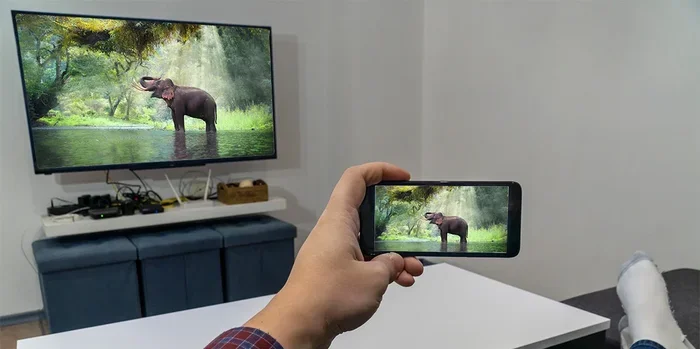
Sometimes the simplest solution is the best. You can plug your phone or laptop directly into your TV using an HDMI cable with the right adapter. This gives you a rock-solid connection with zero latency.
This method works for screen mirroring as well as playing local files. You get full-quality video and audio without any wireless interference. It is especially useful for presentations or watching downloaded movies.
Method 5: Bluetooth Audio Casting
If you only need to stream audio, Bluetooth is your best friend. Most modern speakers and soundbars support Bluetooth pairing. You can send music, podcasts, or audiobooks from your phone directly to the speaker.
The range is shorter than Wi-Fi, usually about 30 feet. But for casual listening in a single room, Bluetooth is more than enough. It is also very easy to set up and does not require any apps or extra hardware.
Devices That Support Offline Casting
Not all casting devices are created equal when it comes to offline functionality. Here is a look at some popular casting devices and how well they handle streaming without WiFi.
Chromecast
Chromecast is one of the most popular casting devices in the world. It supports offline casting through its cast receiver protocol and works well with mobile hotspots. You can cast local files from your phone using apps like VLC or BubbleUPnP. The setup is straightforward and works reliably in most cases.
Apple TV and AirPlay
AirPlay is Apple’s casting technology, and it handles offline streaming quite well. When you and your Apple TV are on the same local network, you can mirror your screen or stream local content. AirPlay uses peer-to-peer discovery, which means it can even work without a router in some scenarios.
Smart TVs with Built-in Casting
Many modern smart TVs from Samsung, LG, and Sony come with built-in screen mirroring and DLNA support. These TVs can connect to your phone directly or through a local hotspot. Check your TV’s settings for options like “Screen Share,” “Mirroring,” or “DLNA Player.”
Streaming Sticks and Boxes
Devices like Roku, Fire TV Stick, and Raspberry Pi setups can also cast offline with the right configuration. Fire TV, for example, supports DLNA apps that let you access local media files. Roku has a feature called Local Media Player that works over a direct connection.
| Device | Offline Casting Method | Ease of Setup |
|---|---|---|
| Chromecast | Mobile hotspot, Wi-Fi Direct | Easy |
| Apple TV | AirPlay, local network | Very Easy |
| Fire TV Stick | DLNA apps, hotspot | Moderate |
| Samsung Smart TV | Screen Mirroring, DLNA | Easy |
| Raspberry Pi | Custom media server | Advanced |
Quick Tips for Successful Offline Casting
Offline casting can be slightly different from regular casting, and a few tips can save you a lot of frustration.
- Always check your Wi-Fi settings. Even without internet, your devices need to be on the same network or directly connected.
- Use the right apps. Not all apps support offline casting. VLC, Plex, and Kodi are your best friends for local media.
- Keep your devices close. Bluetooth and Wi-Fi Direct have range limits. Stay within range for the best experience.
- Download content beforehand. Make sure your media files are saved locally on your device before you try to cast them.
- Restart devices if needed. A quick restart of both your phone and the casting device can fix most connection issues.
Common Mistakes to Avoid
Even with the best setup, people run into problems sometimes. Here are the most common mistakes when casting without internet:
- Forgetting to turn off mobile data. Sometimes your phone tries to use cellular data instead of the local connection, which breaks the cast.
- Using outdated firmware. Old software on your casting device can cause compatibility issues. Always keep your devices updated.
- Not enabling local network discovery. Many devices hide this setting by default. Go into your network settings and make sure discovery is turned on.
- Assuming all apps work offline. Streaming apps like Netflix and Hulu need internet even if you have downloaded content. Use offline-friendly apps instead.
- Ignoring firewall settings. Your computer’s firewall might block local connections. Check your firewall rules if devices cannot find each other.
Expert Insights on Offline Streaming
Can You Cast Without Internet reliably? Industry experts say yes, but with a few caveats. According to networking professionals, the most stable offline casting setups use a dedicated local network rather than trying to rely on ad-hoc connections.
Why Local Network Quality Matters
Even without internet, the quality of your local network affects casting performance. A strong Wi-Fi signal means smoother video playback and less buffering. If you are casting over Wi-Fi Direct, make sure there are no thick walls or heavy interference between your devices.
Experts also recommend using the 5 GHz Wi-Fi band for casting when possible. It is less crowded than the 2.4 GHz band and provides faster data transfer speeds. This makes a noticeable difference when you are streaming high-definition video files locally.
The Future of Offline Casting
As more people work remotely and travel frequently, the demand for offline streaming solutions continues to grow. Manufacturers are increasingly building better offline support into their devices. We can expect wireless display technology to become even more seamless in the coming years.
Emerging standards like Miracast and improved DLNA implementations are making offline casting more accessible. Even budget devices now offer solid offline casting features that rival premium products from just a few years ago.
Key Takeaways
- Offline casting is fully possible using Wi-Fi Direct, Bluetooth, mobile hotspots, and direct HDMI connections.
- Chromecast, AirPlay, and DLNA all support some form of casting without a traditional internet connection.
- Setting up a local hotspot from your phone is the easiest workaround for most casting scenarios.
- Media servers and offline streaming apps let you access local files without needing the web.
- Common mistakes include forgetting to enable local network discovery and using incompatible devices.
- Expert insight: offline casting works best when devices are on the same local network or connected directly.
Conclusion
The answer to Can You Cast Without Internet is a resounding yes. You have multiple reliable methods at your fingertips, from simple mobile hotspots to direct HDMI connections. Whether you are in a cabin in the mountains, a hotel room with no Wi-Fi, or just want to reduce your reliance on the internet, offline casting gives you the freedom to enjoy your media anywhere.
Offline streaming is not just a workaround. It is a practical skill that more and more people need in today’s connected world. By understanding the methods and devices that support local casting, you can set up a seamless entertainment system that works even when the internet is nowhere to be found.
Start experimenting with the methods in this guide. Try a mobile hotspot first, since it is the easiest to set up. Then explore DLNA media servers and Wi-Fi Direct for more advanced setups. Soon, you will be casting like a pro, internet or not.
Remember, the technology is there. You just need to know how to use it. Now go ahead and enjoy your favorite content on the big screen, no matter where you are.
Frequently Asked Questions
Can I cast downloaded Netflix content without internet?
Yes, you can cast downloaded Netflix content to a supported device using a mobile hotspot or local connection. Both your phone and the casting device need to be on the same local network. The Netflix app allows offline downloads, and you can cast those downloads locally without needing the internet.
What is the best app for offline casting?
VLC is widely considered the best app for offline casting. It supports almost all video and audio formats and works with Chromecast, DLNA, and AirPlay. Plex and Kodi are also excellent choices for managing and streaming local media files to your TV.
Does Chromecast work without internet?
Chromecast can work without a traditional internet connection by using a mobile hotspot or peer-to-peer connection. You and the Chromecast device need to be on the same local network. The cast receiver protocol allows direct communication between devices even when there is no external internet access.
Can I use Bluetooth to cast video?
Bluetooth is not ideal for video casting because of its limited bandwidth and range. It works great for audio streaming to speakers and headphones. For video, it is better to use Wi-Fi Direct, a mobile hotspot, or a direct HDMI connection for the best quality and reliability.
Is offline casting slower than online casting?
Not necessarily. Offline casting can actually be faster because the data does not travel through the internet. When you cast locally, the data moves directly between devices on your local network. This means less buffering and smoother playback, especially for high-definition files.
Do I need special hardware for offline casting?
In most cases, no. You can use the devices you already own, such as your smartphone, tablet, or smart TV. A mobile hotspot feature is built into most phones. For wired connections, you may need an HDMI adapter, but these are inexpensive and widely available.