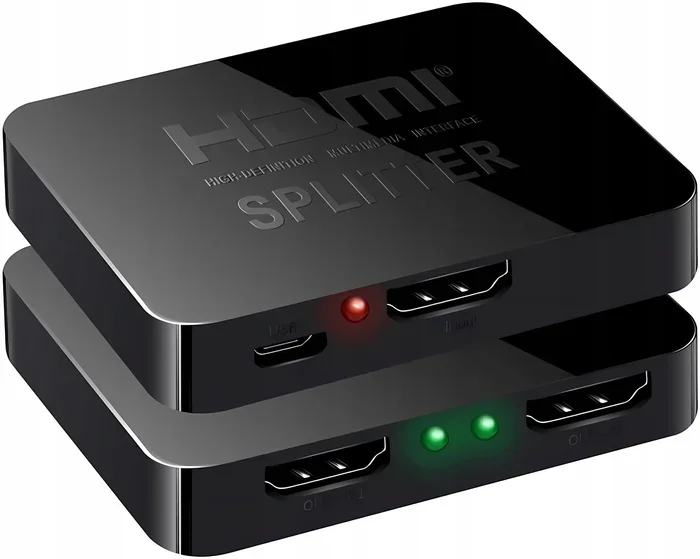
Can I Run 2 TVs Off 1 HDMI Port And Still Get Great Picture
Yes, you can run 2 TVs off 1 HDMI port using a few simple tools. An HDMI splitter is the most popular way to duplicate your signal and share one source across two screens. Whether you want to watch the same movie in two rooms or mirror your display, the right setup makes it easy. This guide walks you through every option, from basic splitters to advanced extenders, so you can pick the best solution for your home.
Key Takeaways
- An HDMI splitter lets you duplicate one port: You can send the same signal to two TVs from a single source device.
- An HDMI switch does the opposite: It lets you connect multiple source devices to one TV with a single cable.
- Powered splitters work better than passive ones: They boost the signal and prevent picture quality loss.
- Resolution matters: Choose a splitter that supports your TV’s resolution, whether 1080p or 4K.
- Distance can be a challenge: HDMI extenders or HDMI over Ethernet kits help you run longer cable runs.
- Common mistakes cause problems: Using the wrong cable, skipping the power source, or choosing a cheap splitter leads to poor results.
- Setup is simple: Most solutions take under 15 minutes and require no technical skills.
📑 Table of Contents
- Can You Actually Run 2 TVs Off 1 HDMI Port?
- How an HDMI Splitter Works for Dual TV Setup
- HDMI Switch vs HDMI Splitter – What’s the Difference?
- Best Ways to Connect 2 TVs to One HDMI Source
- Common Problems When Running 2 TVs Off 1 HDMI Port
- Tips for Getting the Best Picture on Both TVs
- Expert Insights on Dual TV HDMI Setups
- Key Takeaways
- Conclusion
Can You Actually Run 2 TVs Off 1 HDMI Port?
The short answer is yes. You can run 2 TVs off 1 HDMI port and still get a great picture. But how you do it depends on what you want to achieve. Do you want both TVs to show the exact same content? Or do you need different content on each screen? Your goal shapes the right solution.
Most people want to mirror the same content. Think about a living room and kitchen setup. You have a cable box or streaming device in one spot. But you want to watch the same show in two different rooms. An HDMI splitter makes this possible with very little effort.
The process is simpler than most people think. You plug one cable into your source device. Then you split that signal into two outputs. Each output connects to a separate TV. Both screens display the same content at the same time. It works like a charm when you use the right equipment.
But not all splitters are created equal. A cheap splitter might reduce your picture quality. It could also drop the audio signal. That is why choosing the right tool matters so much. This guide covers every option you need to know.
How an HDMI Splitter Works for Dual TV Setup
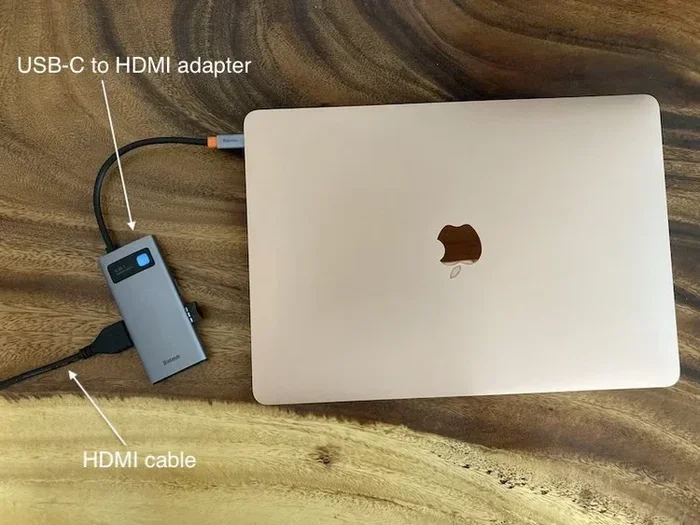
An HDMI splitter takes one input and copies it to multiple outputs. Think of it like a water pipe splitter. One stream of water goes in. Two streams come out. The same idea applies to your video and audio signal.
When you run 2 TVs off 1 HDMI port, the splitter duplicates everything. The video resolution stays the same. The audio channels stay intact. Both TVs receive an identical copy of the original signal. This is called video distribution.
Active vs Passive HDMI Splitters
There are two main types of splitters. Active splitters have their own power source. They use a small power adapter or USB cable. This power boosts the signal. It keeps the picture sharp and the audio clear. Active splitters work great for most setups.
Passive splitters do not need external power. They are cheaper. But they do not boost the signal. Over longer cable runs, the picture can get weak. You might see flickering or no signal at all. For two TVs in the same room, a passive splitter can work fine. But active is always the safer choice.
What Resolution Should You Look For?
Check the resolution support before buying. If you have a 4K TV, your splitter must support 4K. Many budget splitters only go up to 1080p. That means you lose the extra detail on a 4K screen. Always match the splitter to your TV’s capability.
Here are quick tips for choosing the right resolution support:
- 1080p TVs: A basic 1080p splitter works perfectly.
- 4K TVs: Look for a splitter labeled 4K or Ultra HD.
- HDR support: If your TV supports HDR, pick a splitter that does too.
- ARC and eARC: These audio features matter if you use a soundbar or home theater system.
HDMI Switch vs HDMI Splitter – What’s the Difference?
People often confuse these two devices. They do opposite things. Understanding the difference saves you money and frustration.
An HDMI splitter takes one source and sends it to multiple TVs. You run 2 TVs off 1 HDMI port with a splitter. Both TVs show the same content.
An HDMI switch takes multiple sources and sends them to one TV. It lets you connect a game console, a Blu-ray player, and a streaming stick to a single TV. You press a button or use a remote to switch between them. It saves you from swapping cables all the time.
Here is a quick comparison table to clear things up:
| Feature | HDMI Splitter | HDMI Switch |
|---|---|---|
| Input Count | 1 source device | 2 to 5 source devices |
| Output Count | 2 or more TVs | 1 TV |
| Purpose | Duplicate signal | Switch between sources |
| Power Needed | Usually yes (active) | Sometimes |
| Cost | $10 to $50 | $15 to $40 |
Make sure you buy the right one. Buying a switch when you need a splitter is a common mistake. Double-check your setup before you shop.
Best Ways to Connect 2 TVs to One HDMI Source
There are several ways to connect 2 TVs to one HDMI source. Each method has its pros and cons. Let us walk through them one by one.
Method 1: Basic HDMI Splitter
This is the easiest and most affordable option. You plug your source device into the splitter input. Then you run two HDMI cables from the splitter outputs to each TV. Both TVs display the same content simultaneously.
Here is what you need:
- 1 active HDMI splitter with 2 outputs
- 2 HDMI cables (length depends on your setup)
- A power adapter for the splitter
Setup takes about 5 minutes. Plug everything in. Turn on the TVs. Select the right input on each TV. You are done. This method works best when both TVs are in the same room or nearby.
Method 2: HDMI Extender Over Ethernet
What if the TVs are far apart? A regular HDMI cable has a length limit. After about 50 feet, the signal starts to degrade. An HDMI extender solves this problem.
An HDMI extender uses a pair of devices. One plugs into the source device. The other plugs into the TV. They connect through an Ethernet cable or CAT6 wire. This lets you spread your signal across a much longer distance. Some extenders can reach up to 160 feet or more.
This is a great option for large homes or commercial spaces. You can place TVs in different rooms without losing picture quality.
Method 3: HDMI over WiFi or Wireless HDMI
No one wants to run cables through walls. Wireless HDMI kits send the signal through the air. You plug a transmitter into your source device. You plug a receiver into each TV. The signal travels wirelessly.
These kits are convenient. But they can have a slight delay. This is called input lag. For live TV or gaming, the lag might be noticeable. For streaming movies, most people do not notice it at all.
Method 4: Streaming Device with Multi-Room Support
Some streaming platforms support casting to multiple devices. For example, you can use a Chromecast or Apple TV setup to mirror content across rooms. This is not a traditional HDMI method, but it works well for many households.
This approach works best with smart TVs. Each TV needs its own streaming device or built-in smart features. The source device controls all of them from one place.
Common Problems When Running 2 TVs Off 1 HDMI Port
Setting up a dual TV system is usually smooth. But sometimes things go wrong. Here are the most common issues and how to fix them.
No Signal on One TV
If one TV shows no signal, check the cable first. A loose HDMI connection is the number one cause. Unplug the cable and plug it back in firmly. Try a different HDMI port on the TV if available.
If the cable is fine, the splitter might be the problem. Some cheap splitters overheat. They stop sending a signal to one output after a few minutes. An active splitter with its own power supply usually fixes this.
Flickering or Black Screen
Flickering happens when the signal is weak. This often occurs with long cables or passive splitters. Try shortening the HDMI cables. Or upgrade to an active splitter with a built-in signal booster.
Another cause is resolution mismatch. If one TV supports 4K and the other only supports 1080p, the splitter might struggle. Set the output resolution to match the lowest TV in your setup.
No Audio on One TV
Sometimes the picture works but the audio does not. This usually happens with audio extractor setups or when using ARC (Audio Return Channel). Check the audio settings on the source device. Make sure the audio output is set to HDMI, not optical or digital.
Also check the TV’s audio settings. Some TVs default to internal speakers even when an HDMI audio signal is present. Switching the audio output to HDMI solves this quickly.
Tips for Getting the Best Picture on Both TVs
You want both screens to look amazing. These tips help you get the best results every time.
Use High-Quality HDMI Cables
Not all HDMI cables are the same. A cheap cable might not handle 4K or HDR signals. Look for cables rated as “High Speed HDMI” or “Premium High Speed.” These support the full bandwidth you need for sharp, colorful pictures.
Keep the Splitter Cool
Active splitters generate a little heat. Place them in a ventilated area. Do not stuff them inside a closed cabinet. Good airflow keeps the splitter running reliably for years.
Match Your Source Device Settings
Go into the settings menu of your source device. Set the output resolution to match your TVs. If both TVs are 4K, set the output to 4K. If one is 1080p, set the output to 1080p. This prevents compatibility issues and keeps the picture clean on both screens.
Consider an Audio Extractor for Sound Systems
If you have a separate sound system, an audio extractor is very helpful. It pulls the audio signal out of the HDMI cable. You send the audio to your soundbar or home theater system. Meanwhile, the video signal continues to the TVs. This setup gives you the best of both worlds.
Use a Powered Hub for Stability
If you are connecting more than two TVs or adding other devices, consider a powered HDMI hub. It provides stable power to each output. This reduces signal loss and keeps every TV running smoothly. It is especially useful for home theater setups or digital signage.
Expert Insights on Dual TV HDMI Setups
Setting up two TVs from one source is a smart move for many households. It saves money on extra cable boxes and streaming subscriptions. You only pay for one source device and share it across rooms.
Home technology experts agree that an active HDMI splitter is the most reliable solution for most people. It handles the signal duplication cleanly. It supports high resolutions and keeps audio synced perfectly. A passive splitter works in a pinch but lacks the consistency you need for a long-term setup.
For larger setups, HDMI over Ethernet or wireless HDMI kits offer flexibility. They let you place TVs wherever you want without worrying about cable length. The key is to match your method to your space and your needs.
One thing experts stress is to avoid ultra-cheap splitters from unknown brands. These often fail within weeks. They may damage your source device or cause intermittent signal problems. Spending a little more on a reputable brand saves you headaches down the road.
Key Takeaways
- An HDMI splitter is your best friend: It duplicates one HDMI signal to two TVs easily.
- Active splitters outperform passive ones: They boost the signal and maintain picture quality.
- Match your splitter to your TV resolution: A 4K splitter is needed for 4K TVs.
- HDMI switches are different from splitters: Make sure you buy the right device for your goal.
- Wireless and Ethernet extenders solve distance problems: They let you place TVs far from the source device.
- Common issues have simple fixes: Check cables, resolution settings, and splitter power first.
- Invest in quality equipment: A reliable splitter and good cables make all the difference.
Conclusion
Can I run 2 TVs off 1 HDMI port? Absolutely yes. With the right tools, you can duplicate your signal and enjoy the same great content on two screens. An HDMI splitter is the go-to solution for most setups. It is affordable, easy to use, and delivers excellent results.
Whether you choose a basic splitter, an HDMI extender, or a wireless kit, the key is to match the solution to your needs. Consider the distance between your TVs. Think about the resolution you need. And always invest in quality equipment that supports your current setup and future upgrades.
Setting up a dual TV system takes minutes. The result is a more connected, more enjoyable home entertainment experience. You can watch your favorite shows in the living room and the kitchen at the same time. You can share game nights across multiple rooms. The possibilities are simple and satisfying.
Start with an active HDMI splitter. Use good quality cables. Follow the tips in this guide. You will have two TVs running off one HDMI port in no time. And both screens will deliver a great picture every single time.
Frequently Asked Questions
Do I need a powered HDMI splitter to run 2 TVs off 1 port?
Yes, for most setups an active or powered splitter is the best choice. It boosts the signal and ensures both TVs get a clean, strong picture. Passive splitters work for short distances but can cause signal loss over longer cable runs.
Will running 2 TVs through a splitter reduce the picture quality?
A good quality active splitter maintains the original picture quality. Cheap or passive splitters may reduce resolution or cause flickering. Always choose a splitter that supports your TV’s resolution, whether 1080p or 4K.
Can I use an HDMI splitter to show different content on each TV?
No, a standard HDMI splitter duplicates the same content on all connected screens. If you want different content on each TV, you need a separate source device for each TV or a more advanced video distribution system.
How long can my HDMI cable be when using a splitter?
Standard HDMI cables work well up to about 50 feet. Beyond that, the signal weakens. You can use an HDMI extender or an HDMI over Ethernet kit to run cables much longer, sometimes up to 160 feet or more.
Can I connect more than 2 TVs to one HDMI port?
Yes, you can buy HDMI splitters with 4 or even 8 outputs. Just make sure the splitter is powered and supports the resolution and number of TVs you plan to use. Keep in mind that splitting the signal further may require a more powerful booster.
What is the difference between ARC and eARC on HDMI splitters?
ARC (Audio Return Channel) sends audio from your TV back to a soundbar or receiver. eARC supports higher-quality audio formats like Dolby Atmos. If you have a sound system, look for a splitter that supports ARC or eARC for the best audio experience.