Can I Connect Coaxial Cable To Hdtv A Complete Guide
Yes, you can connect coaxial cable to HDTV. Most modern HDTVs have a coaxial input, but older models may need a converter box. This guide walks you through every method, from direct connections to using an RF adapter for the best picture and sound.
So you have a coaxial cable and an HDTV. You want to hook them up. The good news is that connecting coaxial cable to HDTV is very doable. Whether you are setting up cable TV, an antenna, or a satellite dish, the coaxial cable plays a big role. Many people have these cables lying around the house already. But not everyone knows exactly how to make the connection work properly.
This guide will walk you through every step. You will learn about direct connections, converter boxes, signal adapters, and common problems. By the end, you will feel confident hooking up your coaxial cable to your HDTV. Let us get started.
Key Takeaways
- Direct Connection Works: Many HDTVs have a coaxial input built right in for cable TV signals.
- Converter Boxes Help: Older HDTVs without coaxial inputs need a digital converter or RF adapter.
- HDMI Is Still Better: Coaxial gives good quality, but HDMI delivers the best HD resolution.
- Signal Quality Matters: Use short cables and proper F-connectors to avoid signal loss.
- Antenna Signals Work Too: Coaxial cables also carry over-the-air antenna signals to your HDTV.
- Troubleshooting Is Easy: Most coaxial connection problems can be fixed with simple steps.
📑 Table of Contents
Understanding Coaxial Cables and HDTVs
What Is a Coaxial Cable?
A coaxial cable is a round cable with a single copper wire in the center. It has layers of shielding around that wire. This design helps protect the digital signal from interference. Coaxial cables have been around for decades. They are still widely used for cable TV, internet, and antenna connections.
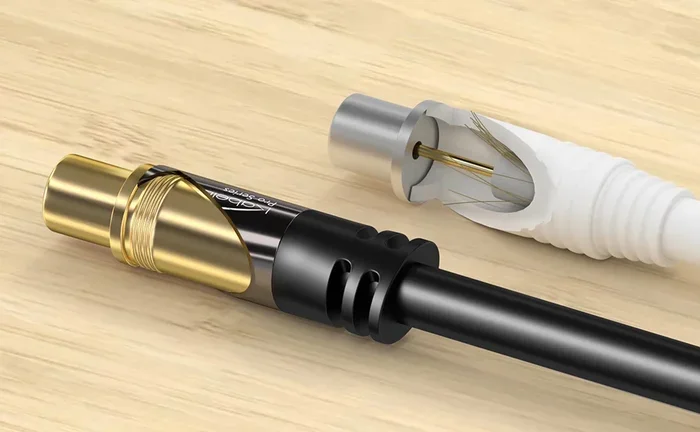
The most common type is the RG-6 cable. It has an F-connector on each end. The F-connector twists onto the TV or wall outlet. These cables carry both audio and video signals. That is one reason they are so popular for cable TV setups.
How Do Modern HDTVs Work?
Modern HDTVs are designed to accept many types of inputs. Most have HDMI ports as the primary connection. But many also include a coaxial input. This is usually labeled as “ANT IN” or “RF IN” on the back or side of the TV.
Inside your HDTV is a digital tuner. This tuner decodes the signals coming through the coaxial cable. The tuner converts the signal into the picture you see on screen. Without a working tuner, the coaxial cable alone cannot display anything. So it is important to know whether your TV has one.
How to Connect Coaxial Cable to Your HDTV
Step-by-Step Connection Guide
Follow these simple steps to make your coaxial cable connection to HDTV work right.
- Find the coaxial input on your TV. Look for “ANT IN” or “RF IN” on the back panel.
- Attach the F-connector on the coaxial cable to the TV input. Twist it clockwise until it is tight.
- Connect the other end of the cable to your cable wall outlet, antenna, or cable box.
- Turn on your HDTV and go to the input or source menu.
- Select the coaxial or antenna input source.
- Run a channel scan to find all available channels.
That is it. You are connected. The process is simple and takes just a few minutes.
What You Need Before You Start
Before you begin, make sure you have the right gear. Here is a quick checklist:
- A coaxial cable: RG-6 is the standard. Make sure it is not too long to avoid signal loss.
- A TV with a coaxial input: Check the back panel for “ANT IN” or “RF IN.”
- A signal source: This could be a wall outlet, antenna, or cable box.
- A cable stripper or wrench: These help you attach the F-connector properly.
Having these items ready makes the whole process smoother. You will not have to stop midway to find a missing tool.
When You Need a Converter Box
Why Some HDTVs Need a Converter
Not all HDTVs have a coaxial input. Some older models only have HDMI and composite ports. If your TV does not have a coaxial input, you cannot connect the cable directly. You need a converter box to bridge the gap.
A converter box takes the coaxial signal and converts it. It then outputs the signal through HDMI or composite cables. This lets your HDTV display the channels properly. The converter box acts as a middleman between the cable and your TV.
RF to HDMI Converters
An RF to HDMI converter is one of the most popular solutions. These small devices cost between 15 and 50 dollars. You plug the coaxial cable into the converter. Then you run an HDMI cable from the converter to your TV.
The converter decodes the coaxial signal. It then sends a clean HDMI signal to your HDTV. This method gives you great HD resolution on screen. It is a simple fix for older TVs without coaxial inputs.
Digital Tuner Solutions
Another option is a standalone digital tuner. This device connects to your coaxial cable. It then sends the decoded signal to your TV through HDMI. A digital tuner works well if your TV tuner is not working properly.
Some people also use a TV tuner card for their computer. This turns a PC into a TV. The tuner card accepts coaxial input and displays channels on a monitor. This is a great budget option for watching cable TV on a big screen.
Common Problems and How to Fix Them
Signal Quality Issues
Sometimes the picture looks fuzzy or the sound cuts out. This usually means the signal is weak. Several things can cause this problem.
- Long cable runs: Coaxial cables lose signal over long distances. Keep your cable under 50 feet for best results.
- Bad F-connector: A loose or damaged connector weakens the signal. Make sure it is tight and undamaged.
- Old or worn cable: Cables degrade over time. Replace any cable that looks frayed or bent.
- Interference: Keep coaxial cables away from power cords. Power cords can cause electromagnetic interference.
A signal adapter can also help boost weak signals. These small devices amplify the signal before it reaches your TV. They are especially useful for homes far from the cable source.
No Picture or Sound Problems
If you see a blank screen or hear no sound, do not panic. Try these quick fixes:
- Check that the coaxial cable is firmly connected at both ends.
- Make sure your TV is set to the correct input source.
- Run a channel scan in your TV settings menu.
- Try a different coaxial cable to rule out a bad cable.
- Restart your TV and cable box if you are using one.
Most of the time, the problem is a loose connection. A quick reseat of the F-connector fixes the issue. If the problem continues, the cable itself may be damaged.
Coaxial vs HDMI: Which Connection Is Better?
Comparing the Two
People often ask whether coaxial or HDMI is the better choice. Both have their strengths. Here is a quick comparison:
- Coaxial cable: Good for cable TV and antenna signals. It carries a solid digital signal. But it does not support the highest HD resolution on its own.
- HDMI: Delivers the best picture and sound quality. It supports full HD and 4K resolution. It is the gold standard for modern HDTVs.
For most people, HDMI is the preferred connection. But coaxial is still very useful. It works great for basic cable TV and antenna setups. Many cable TV providers still use coaxial as their main delivery method.
Quick Tips for Best Results
Want the best experience from your coaxial cable connection to HDTV? Follow these quick tips:
- Use a short, high-quality coaxial cable for the strongest signal.
- Always use F-connectors that are crimped or soldered properly.
- Run a channel scan after every connection change.
- If you use a cable box, connect the box to the TV with HDMI for the best picture.
- Keep cables away from heat sources and sharp bends.
These small steps make a big difference. Your picture will be clearer and your sound will be better.
Expert Tips for the Best HDTV Experience
Optimizing Your Signal
A strong signal makes all the difference. Here is how to get the best signal from your coaxial setup:
- Use a signal amplifier: If you have a long cable run, an amplifier boosts the signal strength. This is especially helpful for antenna setups.
- Check your splitters: Signal splitters reduce signal strength. Use the fewest splitters possible for the best result.
- Keep cables short: The shorter the cable, the stronger the signal. Try to keep runs under 25 feet when possible.
- Use quality cables: Cheap coaxial cables have poor shielding. This leads to signal loss and interference.
Long-Term Setup Advice
Once your coaxial cable HDTV setup is working, keep it maintained. Check connections every few months. Look for any signs of wear or damage. Replace cables that look old or frayed.
If you live in an area with lots of electronic devices, keep your coaxial cables separated from power cords. This reduces interference and keeps your signal clean. A clean signal means a better picture and fewer frustrating dropouts.
Also, consider upgrading your setup over time. If you still rely only on coaxial, adding an HDMI connection can greatly improve your viewing experience. Many modern cable boxes and streaming devices use HDMI as their primary output. Use coaxial for what it does best, and use HDMI for the highest quality.
Key Takeaways
- Direct Connection Is Simple: Most HDTVs with a coaxial input let you connect the cable directly with no extra equipment.
- Converter Boxes Fill the Gap: If your TV lacks a coaxial input, an RF to HDMI converter solves the problem easily.
- Coaxial Still Delivers Great Signals: Modern coaxial cables carry clear digital signals for cable TV and antenna channels.
- HDMI Remains the Gold Standard: For the best HD resolution and sound, HDMI is still the top choice for HDTVs.
- Troubleshooting Is Straightforward: Most connection issues come down to loose cables or bad connectors.
- Signal Quality Depends on Setup: Short cables, proper connectors, and few splitters give you the best results.
Conclusion
So, can you connect coaxial cable to HDTV? Absolutely. The answer is yes. Whether you plug directly into a coaxial input or use a converter box, the setup is straightforward and works well. Coaxial cable to HDTV connections are still very common in homes today. Cable TV providers rely on them, and antenna users depend on them every day.
The key is knowing your TV’s inputs. Check if your HDTV has a coaxial port. If it does, you are good to go. If not, grab a converter box and you will be watching in no time. Always use quality cables and proper connectors. Keep your signal strong and your setup clean.
With the right approach, your coaxial cable delivers excellent picture and sound to your HDTV. Follow the steps in this guide and enjoy your favorite shows in great HD resolution. Happy viewing.
Frequently Asked Questions
Can I connect a coaxial cable directly to my HDTV without a converter?
Yes, if your HDTV has a coaxial input labeled “ANT IN” or “RF IN.” Most modern HDTVs include this input. Just plug the cable in, select the right source, and run a channel scan. If your TV does not have a coaxial input, you will need a converter box.
What type of coaxial cable is best for HDTV?
RG-6 coaxial cable is the best choice for HDTV setups. It has thick shielding and a solid copper center conductor. This design carries a strong digital signal with minimal loss. Avoid thin RG-59 cables for HDTV use because they do not handle high-frequency signals well.
Do I need a special cable box to use coaxial with my HDTV?
It depends on your cable TV provider. Some providers require a cable box for their service. But if you are using an antenna or basic cable, you may not need a box at all. Check with your provider to see what they require for your specific plan.
Why does my coaxial connection to HDTV have no sound?
No sound usually means the audio is not being carried through the coaxial connection properly. This can happen if the cable is loose or damaged. Try reseating the F-connector at both ends. If you are using a converter box, make sure the audio output is set correctly in the box settings.
Can I use a coaxial cable for an antenna with my HDTV?
Yes, coaxial cables work perfectly for antenna setups. Connect the antenna to the coaxial cable and plug the other end into your TV’s ANT IN port. Run a channel scan to find all available over-the-air channels. Use a signal amplifier if you live far from broadcast towers.
Is a coaxial connection to HDTV as good as HDMI?
HDMI provides the best picture and sound quality. It supports full HD and 4K resolution. Coaxial connections deliver good quality but may not match HDMI’s full capabilities. For the best experience, use HDMI when possible. Use coaxial when HDMI is not available or when connecting antenna and basic cable services.


