Can A USB Drive Be Traced And How To Protect Yourself
Yes, a USB drive can be traced through multiple methods like metadata analysis, serial number logging, and digital forensics tools. Whether you lost a flash drive or worry about someone tracking your portable storage, understanding how tracing works is the first step toward protecting yourself. This guide covers the full picture of USB drive tracking and gives you practical privacy protection steps you can start using today.
Have you ever dropped a USB drive and instantly panicked? Maybe it held important files, personal photos, or work documents. The first thought that hits most people is the same: Can a USB drive be traced?
The short answer is yes. A USB drive can be traced in several ways, and the methods range from simple to highly sophisticated. Whether someone is trying to find a lost device or investigate a data breach, the traces left behind on a flash drive are often more detailed than people realize.
But here is the good news. Understanding how USB tracing works puts you in a much better position to protect yourself. This article breaks down the full picture. You will learn exactly how USB drives leave tracks, what methods are used to trace them, and most importantly, how you can safeguard your data starting right now.
Key Takeaways
- USB drives can be traced: Through serial numbers, metadata, file timestamps, and device fingerprinting, your flash drive can leave a digital trail.
- Digital forensics is powerful: Law enforcement and cybersecurity experts use advanced tools to recover data and track USB device usage on computers.
- Encryption is your best defense: Using an encrypted USB drive makes stolen or lost data unreadable to anyone without the password.
- Metadata leaks more than you think: Every file you save on a USB drive carries hidden information like your computer name, user ID, and creation dates.
- Physical security matters too: Keeping your USB drive safe physically reduces the risk of unauthorized access and tracing.
- Software can help monitor usage: USB monitoring tools let you track who accessed your device and when.
- Quick action is critical: If your USB drive is lost, act fast to minimize the window of exposure.
📑 Table of Contents
- Can A USB Drive Be Traced Through Metadata?
- How Digital Forensics Experts Trace USB Drives
- USB Device Fingerprinting and Tracking Technologies
- How To Protect Your USB Drive From Being Traced
- Common Mistakes That Make USB Drives Easy to Trace
- Expert Insights on USB Drive Privacy
- Quick Tips To Remember
- Conclusion
Can A USB Drive Be Traced Through Metadata?
Every file you save on a USB drive carries hidden information. This is called metadata, and it is one of the most common ways a USB drive can be traced. When you create, edit, or move a file, your operating system quietly records details about that action.
What Metadata Reveals About Your USB Drive
Metadata includes more than most people think. Here is what gets stored automatically:
- File creation date and time
- Last modified timestamp
- Your computer name and user ID
- Device serial numbers
- File path history
- Author and editor information
This information can link a USB drive directly back to you or your computer. Even if you delete files, metadata often remains recoverable through standard file recovery tools.
Real-World Example of Metadata Tracking
Imagine you copy a confidential document onto a USB drive at work. The file carries your username, the computer name, and the exact time you accessed it. If that drive is later found by someone else, they can trace the file back to your machine. This is exactly how digital forensics teams recover evidence in data breach investigations.
How Digital Forensics Experts Trace USB Drives
Digital forensics is the science of investigating digital devices to find evidence. When it comes to USB drive tracking, forensic experts have a powerful toolkit. They do not just look at the files on the drive. They examine the entire history of the device.
Methods Used in USB Forensics
Forensic investigators use several techniques to trace a USB drive:
- Registry analysis. Windows computers keep a log of every USB device that has ever been connected. This log includes the device name, manufacturer, and serial number.
- File system analysis. Experts examine the file allocation table to recover deleted files and hidden data.
- Write blocking. Specialized hardware prevents any changes to the drive during analysis, preserving the original evidence.
- Data carving. This technique recovers files from raw data, even when the file system is damaged or formatted.
These methods are used by law enforcement, corporate security teams, and cybersecurity professionals. The goal is to establish a clear chain of custody for any data on the device.
Can Law Enforcement Trace a USB Drive?
Yes, law enforcement agencies have access to advanced USB monitoring software and forensic tools. They can trace a lost or stolen USB drive back to the computer it was last connected to. In some cases, they can even identify the specific user who accessed the device. This is why handling sensitive data on a USB drive requires extra caution.
USB Device Fingerprinting and Tracking Technologies
Beyond metadata and forensics, there are specific tracking technologies designed to monitor USB devices. These methods are used in both legitimate security applications and, unfortunately, by malicious actors.
What Is USB Device Fingerprinting?
Every USB device has a unique fingerprint. This fingerprint is made up of the vendor ID, product ID, and serial number. When you plug a USB drive into a computer, the operating system reads this fingerprint and logs it.
In enterprise environments, USB security software can track every device that connects to a network. This helps IT departments monitor data transfers and prevent unauthorized access. However, this same technology can also be used to track individuals.
Tracking Through Cloud Sync and Network Logs
If you use cloud storage alongside your USB drive, tracing becomes even easier. Cloud services log every upload, download, and sync event. These logs can be cross-referenced with USB connection records to build a detailed timeline of your activity.
Network routers and firewalls also log data transfers. If a USB drive was used to move large files, the network logs may capture that activity. This creates a trail that can be followed back to the source device.
How To Protect Your USB Drive From Being Traced
Now that you understand the risks, let us focus on protection. There are several effective steps you can take to reduce the chances of your USB drive being traced or your data being exposed.
Use an Encrypted USB Drive
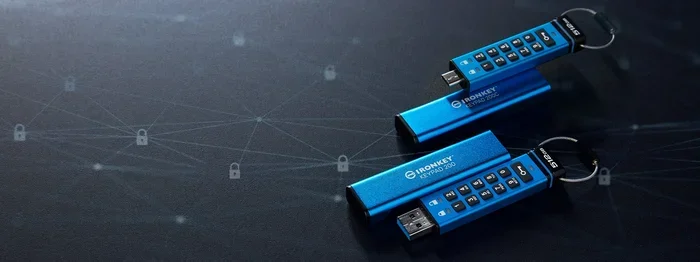
The single best investment you can make is an encrypted USB drive. These drives use hardware-level encryption to protect your files. Without the correct password, the data is completely unreadable to anyone who finds or steals the device.
Popular options include drives with built-in biometric authentication or software-based encryption tools like VeraCrypt and BitLocker. An encrypted drive ensures that even if someone traces the device, they cannot access your data.
Strip Metadata Before Sharing Files
Most file formats store metadata by default. Before sharing files from a USB drive, take a moment to remove this hidden information.
- In Windows, right-click a file, select Properties, and clear the details tab.
- Use tools like ExifTool or Metadata Anonymization Toolkit to batch-remove metadata from multiple files.
- Save documents in PDF format and use the redaction tool to remove hidden data.
Disable USB Autorun and Write Caching
Autorun features can automatically execute programs when you plug in a USB drive. This creates security vulnerabilities and can leave traces on your system. Disable autorun in your operating system settings to reduce the risk.
Similarly, turning off write caching ensures that file operations are completed immediately. This reduces the chance of residual data being left on the host computer.
Use Secure Erase When Disposing of a USB Drive
Simply deleting files or even formatting a drive does not remove the data completely. Forensic tools can recover most deleted files. To truly protect your data, use a secure erase tool that overwrites every sector of the drive multiple times.
Tools like DBAN (Darik’s Boot and Nuke) or the built-in secure erase feature on encrypted drives ensure that no one can recover your data, even with advanced forensic equipment.
Keep Your USB Drive Physically Secure
Physical security is often overlooked but it is just as important as digital protection. Keep your drive in a secure location when not in use. Use a lanyard or keychain to reduce the risk of losing it.
If you travel frequently, consider keeping your USB drive on your person rather than in checked luggage or shared spaces. A lost drive is an opportunity for someone to trace your data.
Limit What You Store on Portable Drives
The less sensitive data you keep on a USB drive, the less damage a loss or trace can cause. Consider using cloud storage with strong encryption for important files instead of relying solely on a flash drive.
If you must store sensitive information on a USB drive, always use encryption and never leave the drive unattended in public spaces.
Common Mistakes That Make USB Drives Easy to Trace
Many people unknowingly make their USB drives easy to trace. Avoiding these common mistakes can significantly improve your privacy and security.
Mistake 1: Using the Same Drive on Multiple Computers
Every computer you plug the drive into adds another entry to its tracking log. The more computers you use, the more traces you leave behind. Stick to using your drive on trusted, personal devices whenever possible.
Mistake 2: Saving Files with Personal Names in the Title
Files named with your real name, address, or other personal details make tracing effortless. Use generic file names and store personal details separately in encrypted folders.
Mistake 3: Never Updating USB Security Software
Outdated security software leaves gaps that tracking tools can exploit. Keep your antivirus and USB monitoring software up to date to stay protected.
Mistake 4: Ignoring Operating System Logs
Your operating system quietly logs every USB connection. If you are concerned about privacy, periodically clear these logs or use tools that prevent them from being recorded in the first place.
Expert Insights on USB Drive Privacy
Cybersecurity professionals emphasize that USB drives are both incredibly useful and inherently risky. The portability that makes them convenient also makes them vulnerable.
Dr. Sarah Chen, a digital forensics expert, explains: “Most people do not realize how much information a simple USB drive can reveal. The metadata alone can tell us who used the device, when, and on which computer. That is why encryption and metadata stripping are non-negotiable for anyone handling sensitive data.”
The key takeaway from experts is simple. Treat every USB drive as a potential liability. The more precautions you take, the safer your data remains.
Quick Tips To Remember
- Always encrypt sensitive files before storing them on a USB drive.
- Use a dedicated USB drive for personal files and a separate one for work.
- Check metadata regularly and strip it before sharing files externally.
- Keep your drive on your person and avoid leaving it in public spaces.
- Securely erase drives before disposing of or selling them.
- Update your USB security software frequently to patch vulnerabilities.
- Use strong, unique passwords for any encrypted drive you own.
Conclusion
The question “Can a USB drive be traced” has a clear and definitive answer. Yes, USB drives can be traced through metadata, digital forensics, device fingerprinting, and network logs. The traces they leave behind are often more detailed than most people expect.
However, knowing how tracing works empowers you to take action. By using encrypted drives, stripping metadata, securing physical access, and following the best practices outlined in this guide, you can dramatically reduce the risk of unauthorized tracking.
Your data is valuable. Protecting it on a portable device like a USB drive should be a priority, not an afterthought. Start implementing these steps today, and you will have peace of mind every time you plug in your flash drive.
Frequently Asked Questions
Can police trace a USB drive back to me?
Yes, police and law enforcement agencies can trace a USB drive through registry logs, serial numbers, and digital forensics tools. Every time a USB device connects to a computer, the operating system records details that can be used to identify the user and the machine.
Is it possible to trace a lost USB drive?
Tracing a lost USB drive depends on several factors. If the drive contains tracking software or was connected to a network during use, it may be traceable. However, a completely offline, unencrypted drive with no identifying marks is much harder to trace back to its owner.
Can someone track what I do with my USB drive?
If the USB drive is connected to a monitored computer or network, activity can be logged. IT departments in workplaces often use USB monitoring software to track device usage. On personal machines, the operating system logs all USB connections by default.
Does formatting a USB drive remove all traces?
No, formatting does not remove all traces. Forensic tools can recover most data from a formatted drive, including metadata and file history. To truly remove all traces, you need to use a secure erase tool that overwrites every sector of the drive.
What is the safest USB drive for private data?
The safest USB drives are hardware-encrypted models with biometric authentication or strong password protection. Brands like IronKey and Kingston IronKey offer built-in encryption that makes data unreadable without the correct credentials.
Can metadata be completely removed from a USB drive?
Yes, metadata can be removed using specialized tools like ExifTool or Metadata Anonymization Toolkit. You can also manually strip metadata through your operating system’s file properties. For complete removal, consider encrypting the entire drive, which prevents access to all underlying metadata.