Can A Plotter Printer Print Photos With Stunning Quality
Yes, a plotter printer can print photos with stunning quality, especially large format inkjet models designed for high-resolution output. These machines use advanced print head technology and pigment or dye inks to produce vivid, detailed images on various media types. Whether you need poster-sized photos, architectural renderings with photo elements, or vibrant wide format prints, a plotter printer delivers professional-grade results when set up correctly.
Have you ever wondered whether a plotter printer can handle photo printing? Maybe you own one for architectural blueprints or large banners and are curious about its photo capabilities. Or perhaps you are shopping for a new printer and want to know if a plotter can replace your photo printer.
The short answer is yes. A plotter printer can print photos with stunning quality. But the full story is more interesting than that. Large format printers, which include many plotter models, use advanced ink delivery systems and high-resolution print heads that can produce breathtaking photo prints. In this article, we will explore exactly how plotter printers handle photo printing, what makes them great or challenging for this task, and how you can get the best results.
Whether you are a professional photographer, a designer, or a hobbyist, understanding what a plotter printer can do for your photos opens up new creative possibilities. Let us dive in.
Key Takeaways
- Plotter printers can absolutely print photos with impressive quality, especially large format inkjet models built for high-resolution image reproduction.
- Print resolution and DPI settings play a huge role in how sharp and detailed your photo prints will look on a plotter.
- Pigment-based inks offer better longevity and color accuracy, while dye-based inks deliver richer saturation for photo use.
- Choosing the right media like glossy photo paper or canvas makes a dramatic difference in final print quality.
- Plotter printers differ from standard photo printers in size, ink systems, and intended use cases, but both can produce beautiful photo prints.
- Common mistakes like wrong color profiles or low-resolution source files can ruin even the best plotter photo output.
- Regular maintenance of print heads and proper calibration keeps your plotter producing stunning photos every time.
📑 Table of Contents
- What Is a Plotter Printer and How Does It Work?
- Can a Plotter Printer Really Print Photos?
- Best Plotter Printers for Photo Printing
- Tips for Getting Stunning Photo Prints from a Plotter
- Plotter Printer vs. Regular Photo Printer
- Common Mistakes When Printing Photos on a Plotter
- Expert Insights on Plotter Photo Printing
- Key Takeaways
- Frequently Asked Questions
- Conclusion
What Is a Plotter Printer and How Does It Work?
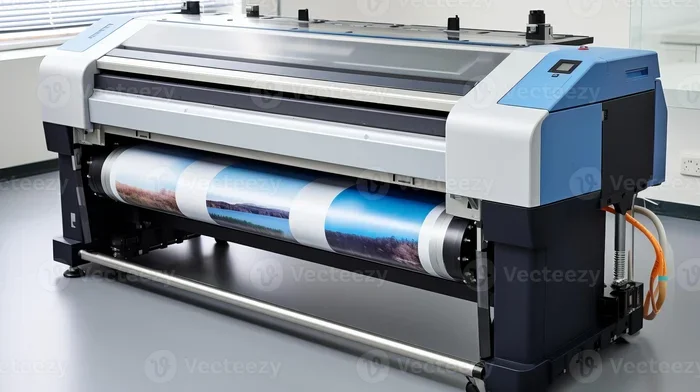
A plotter printer is a type of printer that creates images by moving a pen or print head across paper or other media. Unlike standard desktop printers that spray ink in a fixed grid, traditional plotters use precise mechanical movement to draw lines and shapes. Today, most modern plotters are actually large format inkjet printers that combine traditional plotting precision with photo-quality inkjet technology.
These machines are known for handling oversized print jobs. Architects use them for blueprints. Engineers rely on them for technical drawings. Graphic designers use them for banners and posters. But their capabilities go far beyond line art and text.
How Inkjet Plotters Differ from Traditional Plotters
Modern inkjet plotters have evolved significantly. They now use thousands of tiny nozzles to spray microscopic droplets of ink onto media. This technology is very similar to what you find in high-end photo printers. The key difference is size and scale.
Inkjet plotters can print on rolls of paper, vinyl, fabric, and specialty media that are much larger than standard printer paper. They use either pigment inks or dye inks, each offering different advantages for photo printing.
- Pigment inks sit on top of the media and resist fading. They produce sharp details and accurate colors.
- Dye inks soak into the media and create deeper color saturation. They are excellent for vibrant photo prints.
Can a Plotter Printer Really Print Photos?
The short answer is a resounding yes. Plotter printers can print photos at sizes that standard desktop printers simply cannot match. A large format plotter can produce a photo print that spans several feet wide while maintaining incredible detail and color accuracy.
But the quality of the output depends on several factors. Not every plotter is created equal when it comes to photo printing. Let us look at what matters most.
Print Resolution and DPI
Print resolution is measured in dots per inch, or DPI. The higher the DPI, the more ink droplets are placed per inch, resulting in finer detail and smoother gradients. Most quality plotter printers offer resolutions of 1200 DPI or higher.
For photo printing, you want a minimum of 1200 DPI. Many modern plotters offer 2400 DPI or even 4800 DPI. At these resolutions, individual ink droplets become invisible to the naked eye, creating a seamless, photorealistic image.
Here is a quick look at how DPI affects photo quality:
- 600 DPI: Acceptable for large posters viewed from a distance. Fine details may appear slightly soft up close.
- 1200 DPI: Great for most photo prints. Smooth gradients and sharp details.
- 2400 DPI and above: Professional and fine art quality. Every texture and subtle color shift is captured.
Color Accuracy and Gamut
Color accuracy is critical for photo printing. A good plotter printer should cover a wide color gamut, meaning it can reproduce a broad range of colors. Many high-end plotters use six to twelve ink cartridges, each dedicated to a specific color or tone.
This multi-ink system allows for smoother color transitions and more accurate skin tones, sunsets, and landscapes. Some plotters even include dedicated gray or light cyan and light magenta inks for better shadow detail and reduced color banding.
If you are printing photos, look for a plotter that advertises a wide color gamut and uses multiple ink channels. This makes a huge difference in the final output.
Best Plotter Printers for Photo Printing
Not all plotter printers are ideal for photos. Some are built primarily for technical drawings and line work. Others excel at both. Here are some categories and examples of plotter printers that shine when printing photos.
Large Format Inkjet Plotters
These are the workhorses of the photo printing world. Brands like Epson, Canon, HP, and Mimaki produce large format plotters that handle photo printing beautifully. They typically feature multiple ink tanks, high DPI capabilities, and support for various media types.
Epson is especially well known for its photo-capable large format printers. Models like the Epson SureColor P series use pigment-based inks and advanced print head technology to produce gallery-quality photo prints.
Canon also offers excellent options. Their imagePROGRAF line combines professional-grade print quality with user-friendly features. These printers are popular among wedding photographers and fine art print makers.
Wide Format Printers for Photography Studios
Photography studios often invest in wide format plotters for client presentations, exhibition prints, and portfolio pieces. These machines are designed to handle large volumes and produce consistent, high-quality results.
When choosing a wide format printer for photos, consider these factors:
- Ink type: Pigment or dye based, depending on your longevity and vibrancy needs.
- Print width: Common sizes range from 24 inches to 60 inches wide.
- Media handling: Look for support for roll paper, sheets, and specialty media like canvas or glossy photo paper.
- Software compatibility: Ensure the printer works with your editing software and supports proper color profiles.
Tips for Getting Stunning Photo Prints from a Plotter
Having a great plotter printer is only half the battle. How you set up and execute your print job matters just as much. Here are practical tips to help you get the best photo prints possible.
Use High-Resolution Source Files
Always start with a high-resolution image. A low-resolution photo will look blurry or pixelated no matter how good your plotter is. Aim for source files with at least 300 DPI at the final print size.
For example, if you want to print a photo at 24 inches wide, your source file should be at least 7200 pixels wide. This ensures the printer has enough data to produce a sharp, detailed print.
Calibrate Your Monitor and Printer
Color management is essential. If your monitor shows colors incorrectly, your edits will be off, and your prints will not match what you see on screen.
Use a hardware calibration tool to ensure your monitor displays accurate colors. Also, install the correct ICC color profile for your specific printer and media combination. Most plotter manufacturers provide these profiles for free on their websites.
Choose the Right Media
The paper or material you print on has a massive impact on the final result. For photo prints, consider these options:
- Glossy photo paper: Produces vibrant, saturated colors with a shiny finish. Great for portfolios and presentations.
- Matte photo paper: Offers a non-reflective surface with rich tones. Ideal for gallery displays and framing.
- Canvas: Gives photos a painterly texture. Popular for wall art and fine art reproductions.
- Luster or semi-gloss paper: A popular choice among photographers. It offers a balance between gloss and matte, with excellent color depth.
Run Test Prints Before Big Jobs
Never skip test prints. Print a small section of your image first to check colors, sharpness, and overall quality. Adjust settings as needed before committing to a full-size print. This saves time, ink, and expensive media.
Maintain Your Plotter Regularly
A well-maintained plotter produces better prints. Clean the print heads regularly to prevent clogging. Run nozzle checks before important print jobs. Keep the machine in a clean, temperature-controlled environment for consistent results.
Plotter Printer vs. Regular Photo Printer
It is natural to wonder how a plotter printer compares to a regular photo printer. Both can produce beautiful photo prints, but they serve different needs.
| Feature | Plotter Printer | Regular Photo Printer |
|---|---|---|
| Max Print Size | Up to 60 inches wide or more | Typically 8.5 x 11 or 13 x 19 inches |
| Print Resolution | 1200 to 4800 DPI | 1200 to 9600 DPI |
| Ink System | Multiple ink tanks or cartridges | Typically 4 to 6 ink cartridges |
| Media Types | Roll paper, vinyl, canvas, fabric, thick stock | Standard photo paper, glossy, matte |
| Best For | Large posters, banners, fine art prints, technical work | Small to medium photo prints, snapshots |
| Cost | Higher initial cost, lower cost per square inch | Lower initial cost, higher cost per large print |
| Footprint | Large, requires dedicated space | Compact, fits on a desk |
As you can see, a plotter printer is the clear winner for large photo prints. A regular photo printer is better suited for everyday small prints. Many professionals use both, depending on the project.
Common Mistakes When Printing Photos on a Plotter
Even with the best plotter printer, mistakes can happen. Avoid these common pitfalls to ensure your photo prints turn out stunning every time.
Using Low-Resolution Images
This is the number one mistake. A small image stretched to a large print size will look blurry and pixelated. Always verify your source file resolution before sending a job to the plotter.
Ignoring Color Profiles
Skipping color profile setup leads to disappointing prints. Colors may look washed out, too warm, or too cool. Always apply the correct ICC profile for your printer and media combination.
Skipping Nozzle Checks
A clogged nozzle can ruin an entire print run. Always run a nozzle check and print head cleaning cycle before starting a large or important photo print job.
Using the Wrong Media Setting
Every plotter printer has media settings that tell it how much ink to lay down and how fast to print. Using the wrong setting for your paper type can result in bleeding, smearing, or dull colors. Always match the media setting to your actual paper.
Not Allowing Prints to Dry
Large format prints, especially on glossy media, can smudge if handled too soon. Allow prints to dry completely before stacking or framing them. This is especially important with dye-based inks.
Expert Insights on Plotter Photo Printing
Professional print makers and photographers who use plotter printers daily share a few insights that can help you get better results.
Always soft-proof your images before printing. Most professional editing software allows you to simulate how your image will look when printed on a specific printer and paper combination. This helps you catch color issues on screen rather than after printing.
Invest in quality inks and media. Cheap third-party inks may save money upfront, but they can clog print heads and produce inferior color accuracy. Stick with manufacturer-recommended inks and papers for the best results.
Keep a print log. Note which settings, papers, and inks you used for each print. This makes it easy to reproduce great results and avoid repeating mistakes.
Understand your printer’s print head technology. Different plotters use different print head designs. Some use thermal technology, while others use piezoelectric technology. Piezoelectric heads tend to offer better precision and ink versatility, which benefits photo printing.
Key Takeaways
- Plotter printers can absolutely print photos with stunning quality, especially large format inkjet models designed for high-resolution output.
- Print resolution and DPI settings play a huge role in how sharp and detailed your photo prints will look on a plotter.
- Pigment-based inks offer better longevity and color accuracy, while dye-based inks deliver richer saturation for photo use.
- Choosing the right media like glossy photo paper or canvas makes a dramatic difference in final print quality.
- Plotter printers differ from standard photo printers in size, ink systems, and intended use cases, but both can produce beautiful photo prints.
- Common mistakes like wrong color profiles or low-resolution source files can ruin even the best plotter photo output.
- Regular maintenance of print heads and proper calibration keeps your plotter producing stunning photos every time.
Frequently Asked Questions
Can any plotter printer print photos, or do I need a specific model?
Most modern large format inkjet plotters can print photos, but not all are optimized for it. Technical plotters designed for CAD drawings may lack the color accuracy and ink systems needed for beautiful photo prints. Look for models specifically marketed as photo-capable or wide format photo printers for the best results.
What is the best paper for printing photos on a plotter printer?
Luster paper and glossy photo paper are the most popular choices for plotter photo printing. Luster offers a nice balance of shine and texture, while glossy delivers maximum color vibrancy. Canvas is also a favorite for fine art photo reproductions. Always choose media that is compatible with your printer’s ink system.
Are plotter photo prints as good as lab prints?
In many cases, yes. High-end plotter printers can match or even exceed the quality of professional lab prints, especially for large formats. The key is using high-resolution source files, correct color profiles, and quality media. When done right, plotter prints can be gallery-worthy.
How much does it cost to print photos on a plotter printer?
The cost depends on print size, media type, and ink usage. A large format photo print on quality paper typically costs between 2 and 10 dollars per square foot in ink and media. While the per-print cost is higher than a small desktop photo printer, plotters are more cost-effective for large prints because they spread ink over a bigger area.
Can a plotter printer print photos on canvas or fabric?
Yes, many plotter printers support canvas and fabric media. These materials create beautiful, textured photo prints ideal for wall art and decorative purposes. Just make sure to select the correct media type and ICC profile in your print settings for the best results.
How do I maintain my plotter printer for consistent photo quality?
Run nozzle checks regularly, clean print heads as needed, and use the printer at least once a week to prevent ink from drying in the nozzles. Store the machine in a clean, climate-controlled environment. Also, keep your raster image processor software updated to ensure optimal print rendering.
Conclusion
A plotter printer can print photos with stunning quality, and the results can be truly breathtaking. Whether you are creating large-format wall art, exhibition prints, or client presentations, a quality plotter delivers professional-grade photo output that rivals any dedicated photo printer.
The key is understanding your machine, using the right settings, choosing quality media, and maintaining your equipment properly. With the right approach, your plotter printer becomes a powerful tool for producing beautiful, vivid, and long-lasting photo prints.
So yes, if you have been wondering whether a plotter printer can handle your photo printing needs, the answer is a confident yes. Explore your options, experiment with different settings and media, and enjoy the creative freedom that large format photo printing brings to your work.