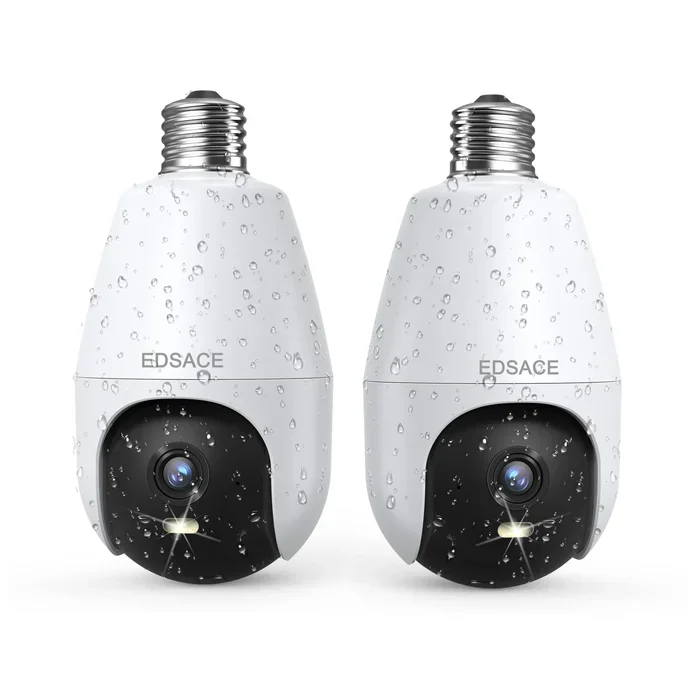
Can Light Bulb Security Camera Get Wet in Rain Safely
Yes, many light bulb security cameras can get wet, but not all of them are created equal. Understanding the waterproof and weatherproof ratings of your light bulb security camera is essential before mounting it outside. This guide covers IP ratings, installation tips, common mistakes, and expert advice to keep your outdoor light bulb camera safe in any weather.
Key Takeaways
- Not all bulb cameras are waterproof: Always check the IP rating before installing outdoors.
- IP65 and IP66 ratings handle rain well, but IP67 and IP68 offer full submersion protection.
- Improper installation is the leading cause of water damage in light bulb security cameras.
- Regular maintenance like cleaning seals and checking for cracks extends camera life.
- Waterproof bulb cameras cost slightly more but save money on replacements long-term.
- Never force-seal a non-waterproof camera with DIY methods, as this can cause overheating.
- Rain alone rarely damages cameras — standing water and direct hose spray are bigger threats.
📑 Table of Contents
- What Is a Light Bulb Security Camera?
- Can Light Bulb Security Camera Get Wet in Rain Safely?
- How to Tell If Your Bulb Camera Is Waterproof
- Best Practices for Installing Outdoor Light Bulb Cameras
- Expert Insights on Weatherproofing Your Security Setup
- Comparing Waterproof vs. Water-Resistant Bulb Cameras
- What to Do If Your Bulb Camera Gets Wet Accidentally
- Key Takeaways
- Conclusion
What Is a Light Bulb Security Camera?
A light bulb security camera is a two-in-one device. It replaces your regular light bulb and doubles as a hidden surveillance camera. These smart devices have grown in popularity because they blend into everyday home fixtures. You get bright lighting and video monitoring in one package.
Most bulb cameras screw into standard light sockets. They connect to your home Wi-Fi network and stream video to your phone. Many models include motion detection, night vision, and two-way audio. They are perfect for porches, garages, and hallways.
But here is the big question many homeowners ask: can light bulb security camera get wet? The short answer is: it depends. Some models handle rain just fine. Others can suffer serious damage if water gets inside. Let us break down exactly what you need to know.
Can Light Bulb Security Camera Get Wet in Rain Safely?
The question can light bulb security camera get wet comes up all the time. And the answer is not a simple yes or no. It depends on the camera’s design, build quality, and weatherproof rating. Let us look at what makes some bulb cameras rain-ready and others not.
Understanding IP Ratings and Water Resistance
Every electronic device has an IP rating. IP stands for Ingress Protection. This rating tells you how well a device resists water and dust. The rating has two numbers. The first number is dust protection. The second number is water protection.
Here is a quick breakdown of what those numbers mean for your outdoor light bulb camera:
- IP44: Splash-resistant only. Not safe for rain exposure.
- IP54: Dust-protected and splash-resistant. Light rain only.
- IP65: Dust-tight and protected against water jets. Handles rain well.
- IP66: Dust-tight and protected against strong water jets. Great for outdoor use.
- IP67: Dust-tight and can survive brief submersion in water.
- IP68: Dust-tight and can survive continuous submersion. The gold standard.
If you want to know if your light bulb security camera get wet safely, check the IP rating on the box or manual. A rating of IP65 or higher is ideal for outdoor use. Anything below IP65 should stay indoors.
What Happens When Water Gets Inside a Bulb Camera
Water damage to a bulb security camera can happen fast. Moisture seeps through tiny gaps in the housing. Once inside, it hits the circuit board and camera lens. This can cause several problems:
- Short circuits: Water conducts electricity. It can fry the internal components quickly.
- Foggy lens: Condensation forms on the inside of the glass. Your video becomes blurry and unusable.
- Corrosion: Metal parts inside rust over time. This slowly kills the camera even after it dries out.
- Mold growth: Moisture creates a perfect environment for mold. This damages wiring and sensors.
- Wi-Fi signal loss: Water can disrupt the internal antenna. Your camera may lose connection to your network.
Some damage is immediate and obvious. Other damage builds up slowly over weeks. By the time you notice the problem, the camera may already be dead. This is why prevention matters so much.
How to Tell If Your Bulb Camera Is Waterproof
Not every light bulb security camera is built for outdoor use. Some look tough but are really indoor-only devices. Here is how you can tell if your bulb camera can handle wet conditions.
Check the Product Label and Packaging
The easiest way is to look at the product label. Reputable brands list the IP rating clearly. If the box says waterproof or weatherproof, it should handle rain. But always verify with the actual IP number. The words “waterproof” and “weatherproof” are not regulated. Any brand can print them on the box.
Look at the Build Quality
A waterproof outdoor light bulb camera usually has a rubber gasket around the base. This gasket seals the connection point where the bulb meets the socket. Some models also have a silicone seal around the lens housing. Run your fingers over the camera body. If you feel a rubber or silicone seal, that is a good sign.
Read User Reviews
Real-world reviews tell you a lot. Search for reviews from people who have used the camera in rainy climates. Look for comments about water damage, fogging, or connectivity issues after storms. Honest reviews are one of the best resources you have.
Contact the Manufacturer
If you cannot find the IP rating anywhere, contact the manufacturer directly. Ask them specifically about rain resistance. A reputable company will give you a clear answer. If they dodge the question, that is a red flag.
Best Practices for Installing Outdoor Light Bulb Cameras
Installing a light bulb security camera outdoors takes a little more thought than indoor setups. You need to protect the camera from rain, humidity, and temperature swings. Here are the best practices that actually work.
Placement Tips to Avoid Water Damage
Where you mount your bulb camera matters a lot for its lifespan. Follow these placement guidelines to keep water away:
- Under an overhang: Mount the camera under a porch roof or eave. This shields it from direct rainfall.
- Face downward slightly: Angle the camera so water runs off the lens naturally.
- Avoid low spots: Do not install near ground level where water pools after rain.
- Stay away from sprinklers: Sprinkler spray hits cameras harder than rain does. Keep a safe distance.
- Use a wall mount: Wall-mounted bulbs stay drier than those in open hanging fixtures.
Quick Tips for Keeping Your Camera Dry
Even waterproof cameras benefit from extra care. Here are some simple tips that make a big difference:
- Wipe the camera monthly: Use a soft cloth to remove dust and debris from the housing.
- Check the gasket every 3 months: Look for cracks or gaps in the rubber seal.
- Apply silicone grease: A thin layer on the gasket keeps it flexible and watertight longer.
- Use a rain cover: A small camera rain hood adds extra protection during heavy storms.
- Inspect after big storms: Check for water droplets inside the lens after severe weather.
Common Mistakes That Damage Light Bulb Cameras
Many homeowners accidentally ruin their light bulb security camera get wet situations by making simple mistakes. Here are the most common ones to avoid:
Mistake 1: Assuming All Bulb Cameras Are Outdoor-Ready
This is the number one mistake. Just because a camera looks sturdy does not mean it can handle rain. Always verify the IP rating before installing outdoors.
Mistake 2: Over-Tightening the Bulb
Screwing the bulb in too hard can crack the housing or damage the rubber seal. Hand-tight is usually enough. If you need more, use a cloth for grip and stop when you feel resistance.
Mistake 3: Ignoring Temperature Changes
Heat and cold cause condensation inside the camera. This is different from rain water, but it causes the same damage. Choose a camera with good ventilation if you live in areas with big temperature swings.
Mistake 4: Using Indoor Extension Sockets Outdoors
Standard indoor sockets are not weatherproof. Water can enter the socket connection and travel up into the camera. Use outdoor-rated sockets and weatherproof junction boxes instead.
Mistake 5: Skipping Firmware Updates
This sounds unrelated, but outdated firmware can cause the camera to overheat. Overheating creates internal condensation. Keep your firmware updated to prevent this issue.
Expert Insights on Weatherproofing Your Security Setup
Expert Insight: According to security professionals, the biggest factor in camera longevity is not the IP rating alone. It is how well you maintain the seals and connections. Even an IP68-rated camera can fail if the gasket degrades over time. Regular inspection is the key.
Security expert Mark Dawson from SafeHome.org recommends a simple routine: “Check your outdoor light bulb security camera every season. Look at the gasket, clean the lens, and test the Wi-Fi connection. Ten minutes of maintenance can add years to your camera’s life.”
Another expert tip comes from home inspector Sarah Lin. She suggests using a weatherproof junction box for extra protection. “The bulb itself might be rated IP65,” she explains. “But the socket and wiring behind it? Those are often the real weak points. A junction box covers that gap completely.”
Also consider the wireless security camera ecosystem around your bulb camera. If your router is indoors but the camera is outdoors, the signal has to pass through walls and rain. A mesh Wi-Fi system with an outdoor access point keeps your connection strong and reliable in all weather.
Comparing Waterproof vs. Water-Resistant Bulb Cameras
The terms “waterproof” and “water-resistant” get thrown around a lot. They mean very different things. Here is a comparison table to clear up the confusion:
| Feature | Water-Resistant | Waterproof |
|---|---|---|
| IP Rating Range | IP44 to IP55 | IP65 to IP68 |
| Rain Handling | Light drizzle only | Heavy rain and storms |
| Hose Spray | Not safe | Safe |
| Submersion | Not safe | Safe (IP67 and above) |
| Best For | Covered porches, garages | Open outdoor areas |
| Price Range | Lower cost | Slightly higher cost |
| Maintenance Need | Higher | Lower |
When choosing a light bulb security camera for outdoor use, always go waterproof over water-resistant. The price difference is small compared to the cost of replacing a water-damaged camera. Your peace of mind is worth it.
What to Do If Your Bulb Camera Gets Wet Accidentally
Even with the best precautions, accidents happen. If your outdoor light bulb camera gets soaked, here is what you should do right away:
- Turn off the power: Switch off the light switch or remove the bulb carefully. Do not touch any wet parts with wet hands.
- Remove the bulb gently: Unscrew it slowly. If it is stuck, let it dry for a few hours first.
- Dry the exterior: Use a clean, dry cloth to wipe away all surface water.
- Let it air dry: Place the camera in a warm, dry area for at least 24 hours. Do not use a hair dryer or heater directly on it.
- Check for condensation: Look inside the lens housing. If you see fog or droplets, give it more time to dry.
- Test before reinstalling: Once completely dry, screw it back in and test the video feed. Check for any flickering or signal loss.
If the camera does not work after drying, it may have internal corrosion. At that point, replacement is usually the best option. This is why prevention through proper waterproofing is always better than repair.
Key Takeaways
- Not all bulb cameras are waterproof: Always check the IP rating before installing outdoors.
- IP65 and IP66 ratings handle rain well, but IP67 and IP68 offer full submersion protection.
- Improper installation is the leading cause of water damage in light bulb security cameras.
- Regular maintenance like cleaning seals and checking for cracks extends camera life.
- Waterproof bulb cameras cost slightly more but save money on replacements long-term.
- Never force-seal a non-waterproof camera with DIY methods, as this can cause overheating.
- Rain alone rarely damages cameras — standing water and direct hose spray are bigger threats.
Conclusion
So, can light bulb security camera get wet? The answer is yes — but only if the camera is designed for it. A light bulb security camera with a proper IP65 rating or higher handles rain safely and reliably. The key is knowing your camera’s rating, installing it correctly, and maintaining it regularly.
Do not assume that a rugged-looking bulb camera is automatically outdoor-ready. Always verify the waterproof rating. Check the seals. Follow the installation tips in this guide. These small steps protect your investment and keep your home security running smoothly through every season.
Whether you are upgrading your home security system or adding a new outdoor light bulb camera to your porch, the right preparation makes all the difference. Stay dry, stay safe, and enjoy the peace of mind that comes with a well-protected surveillance setup.
Frequently Asked Questions
Can I leave my light bulb security camera outside during a storm?
If your camera has an IP65 rating or higher, it should survive a storm just fine. However, if your camera is rated IP44 or lower, bring it inside before bad weather hits. Storms can produce wind-driven rain and debris that exceed the protection of lower-rated cameras.
What is the difference between weatherproof and waterproof for bulb cameras?
Weatherproof usually means the camera resists light rain and humidity. Waterproof means it can handle heavy rain, water jets, and sometimes even submersion. Always check the IP rating to know exactly what level of protection your light bulb security camera offers.
How do I know if water has gotten inside my bulb camera?
Signs of internal water include a foggy or blurry lens, flickering video, connection drops, and the camera not turning on. If you notice any of these after rain exposure, remove the bulb and let it dry completely before testing again.
Can I use a ziplock bag to protect my bulb camera from rain?
This is a bad idea. A ziplock bag traps heat and blocks ventilation. Your camera can overheat, which causes internal condensation and eventually kills the electronics. Instead, buy a camera rated for outdoor use or use a proper weatherproof junction box.
Do all smart bulb cameras work outdoors?
No, not all of them. Many smart bulb cameras are designed only for indoor use. Check the manufacturer’s specifications for the IP rating and outdoor use approval before mounting any light bulb security camera outside.
How often should I check the seals on my outdoor bulb camera?
Inspect the rubber gasket and seals every three months. Harsh weather, UV exposure, and temperature changes can degrade the rubber over time. Catching a worn seal early prevents water damage and extends the life of your camera significantly.