How Do I Adjust Volume Without Volume Button on My Phone
Struggling with a broken or missing volume button? You can still control your phone’s sound with built-in settings, voice commands, and third-party apps. This guide covers every method to adjust volume without volume button on both Android and iPhone. You will learn quick, practical fixes that work right now.
Key Takeaways
- On-Screen Slider: Use the software volume slider in your phone’s notification panel or settings menu.
- Voice Commands: Activate Google Assistant or Siri to raise or lower volume hands-free.
- Accessibility Options: Enable assistive touch or accessibility shortcuts for alternative volume controls.
- Third-Party Apps: Download volume booster or control apps from your app store for extra flexibility.
- Bluetooth Devices: Adjust volume directly from a connected Bluetooth speaker or headphone.
- Quick Settings Tile: Add a volume tile to your phone’s quick settings panel for one-tap access.
- Physical Alternatives: Use a volume rocker replacement or connect external speakers as a workaround.
📑 Table of Contents
- How Do I Adjust Volume Without Volume Button on My Phone
- Use the On-Screen Volume Slider
- Use Voice Commands to Control Volume
- Try Accessibility Features for Volume Control
- Use Third-Party Apps for Volume Control
- Connect External Devices for Volume Control
- Prevent Future Volume Button Problems
- Expert Insights on Phone Volume Control
- Common Mistakes People Make When Volume Buttons Fail
- Final Thoughts
How Do I Adjust Volume Without Volume Button on My Phone
Your phone’s volume button just stopped working. Maybe it is stuck. Maybe it broke after a drop. Or maybe your phone simply does not have one. Whatever the reason, you still need to hear your music, take calls, and watch videos. The good news is that you have many ways to adjust volume without volume button on your phone. You do not need to be a tech expert either. Most of these methods take just a few seconds to set up. In this guide, we will walk you through every option step by step. You will find solutions for both Android and iPhone users. Let us get your sound working again.
Phone volume control matters more than most people think. Think about how often you adjust volume during the day. You turn it up for a podcast. You turn it down during a meeting. You mute it at night. When the physical button fails, it can feel like your phone is useless. But it is not. Your phone has built-in software tools designed exactly for this situation. You just need to know where to look. This article will show you all of them. You will be surprised how many options exist.
Use the On-Screen Volume Slider
The easiest and most obvious way to adjust volume without volume button is the on-screen slider. Every smartphone has one built in. You just need to know how to find it. This method works on both Android and iPhone. It requires no downloads or extra setup. Here is how to do it on each platform.
On Android Phones
Swipe down from the top of your screen. You will see the notification panel. Look for the volume slider there. It usually appears on the right side. Tap the speaker icon to mute or unmute. Drag the slider up to increase volume. Drag it down to lower volume. You can also tap the gear icon to open sound settings. From there, you can adjust media, ringtone, and alarm volumes separately. This gives you fine control over every sound your phone makes.
Some Android phones let you add a volume tile to your quick settings. Swipe down twice to open the full quick settings panel. Look for a pencil or edit icon. Tap it to customize your tiles. Find the volume tile and drag it into your quick settings. Now you can adjust volume with one tap anytime. This is a great shortcut if your volume button is broken.
On iPhones
On iPhone, swipe down from the top right corner. This opens the Control Center. You will see a volume slider right in the middle. Drag it up or down to change volume. Tap the speaker icon to mute. You can also go to Settings and then Sounds & Haptics. There, you can adjust ringer, alerts, and media volumes individually. The iPhone also lets you use the on-screen slider while playing music. Just open Control Center during playback. The volume slider will appear larger for easy access.
Use Voice Commands to Control Volume
Voice commands are one of the coolest ways to adjust volume without volume button. You just speak to your phone, and it does the work. This method is perfect when your hands are busy or the button is completely broken. Both Android and iPhone support voice-based volume control.
Google Assistant on Android
Say “Hey Google” to wake your assistant. Then say something like “turn up the volume” or “set volume to 50 percent.” Google Assistant will adjust it right away. You can also say “mute my phone” or “lower the media volume.” The assistant understands many natural phrases. You do not need to use exact commands. Just speak naturally. This feature works even when your screen is off. It is hands-free and very convenient.
Siri on iPhone
On iPhone, activate Siri by saying “Hey Siri” or holding the side button. Then say “increase volume” or “set volume to three.” Siri will handle the rest. You can also say “mute my iPhone” or “turn down the music.” Siri works great with Apple Music, Spotify, and other apps. The voice control feature also lets you navigate your phone entirely by voice. You can open apps, play music, and yes, control volume. All without touching a single button.
Voice control is especially helpful for people with limited mobility. It is also great when you are cooking, driving, or multitasking. Setting up voice commands takes only a minute. The convenience is worth it. Many people discover this feature and never go back to physical buttons.
Try Accessibility Features for Volume Control
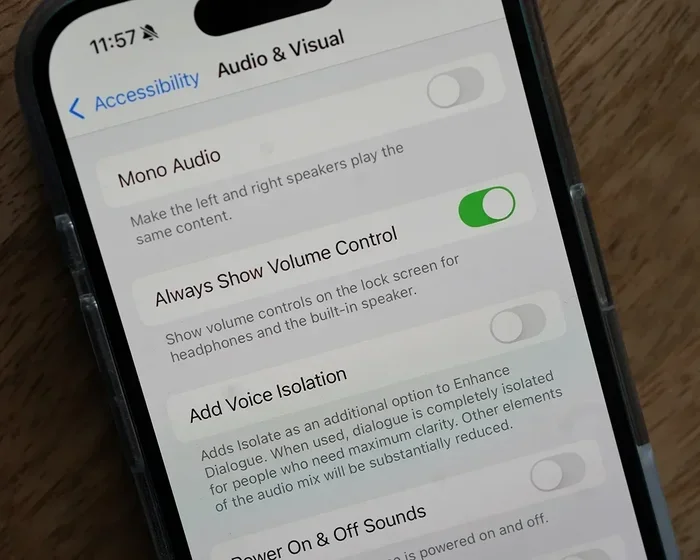
Both Android and iPhone have accessibility features that can help you adjust volume without volume button. These tools were designed for people with physical disabilities. But they work great for anyone with a broken button too. They add on-screen controls that replace the physical volume rocker.
Assistive Touch on iPhone
Go to Settings on your iPhone. Tap Accessibility. Then tap Touch. Look for AssistiveTouch and turn it on. A floating button will appear on your screen. Tap it to open the menu. You will see a volume option there. Use it to raise or lower your phone’s volume. You can also customize the top-level menu to add a volume tile. This makes volume control even faster. AssistiveTouch is a hidden gem that many iPhone users never discover.
Accessibility Menu on Android
On Android, go to Settings and tap Accessibility. Look for the Accessibility Menu option. Turn it on. A small icon will appear on your screen. Tap it to open a menu with volume controls. You can adjust media volume, ringtone volume, and alarm volume from this menu. Some Android phones also offer a “Switch Access” feature. This lets you use your screen as a series of buttons. You can assign volume up and volume down to on-screen switches. It takes a little setup but works very well.
These accessibility tools are powerful. They give you full control over your phone’s sound. Best of all, they are free and built right into your operating system. You do not need to download anything extra.
Use Third-Party Apps for Volume Control
If the built-in options are not enough, you can try third-party apps. Many apps are designed specifically to help you adjust volume without volume button. These apps add extra controls and customization options. They can replace the missing physical button entirely. Here are some of the best options available.
Volume Booster Apps
Apps like Volume Booster and Sound Amplifier let you push your phone’s volume beyond normal limits. They work through software amplification. You can set custom volume levels for different situations. Some apps let you create profiles. For example, you can have a “quiet” profile for work and a “loud” profile for workouts. These apps often include on-screen sliders and widget controls. You can adjust volume right from your home screen.
Button Replacement Apps
Some apps can turn your screen into a virtual volume button. They create on-screen buttons that mimic the physical volume rocker. You can place them anywhere on your screen. Some apps let you resize them or make them transparent. This is a great solution if your volume button is physically damaged. The app acts as a temporary or permanent replacement. Just search your app store for “volume button replacement” to find options.
Before downloading any app, check the reviews and ratings. Stick with well-known developers. Avoid apps that ask for unnecessary permissions. A good app should only need access to your audio settings. Keep your phone safe while exploring these tools.
Connect External Devices for Volume Control
Another clever way to adjust volume without volume button is to use external audio devices. When you connect speakers or headphones, the volume controls often shift to the device itself. This means you can control sound without touching your phone’s buttons at all.
Bluetooth Speakers and Headphones
Pair your phone with a Bluetooth speaker or headphones. Most Bluetooth devices have their own volume controls. You can adjust the sound right from the speaker or headset. This works great for music, podcasts, and videos. If your phone’s volume button is broken, this is an easy workaround. Just remember that you can still use the on-screen slider too. Bluetooth volume control is convenient but not a permanent fix.
For example, if you connect a Bluetooth speaker, you can sit across the room and adjust the volume from the speaker. This is perfect for parties or gatherings. You do not even need to pick up your phone. The same applies to Bluetooth headphones. Many wireless earbuds have touch controls. You can tap or swipe to change volume. It is a seamless experience once you set it up.
External Speakers via Cable
You can also plug in external speakers using a cable. Many portable speakers have a 3.5mm input or USB-C connection. Once connected, you can use the speaker’s knobs or buttons to control volume. This is a simple and reliable method. It works with most phones, even older models. Just make sure you have the right cable or adapter. A speaker volume adjustment this way gives you physical controls again. It feels almost like having a working volume button on your phone.
Prevent Future Volume Button Problems
Once you get your volume working again, you want to keep it that way. Preventive care can save you from future headaches. Here are some simple tips to protect your phone’s volume buttons.
- Use a protective case. A good case cushions your phone from drops. This reduces the risk of damaging the volume buttons.
- Keep your phone clean. Dust and debris can get inside the buttons. Use a soft brush to clean around them regularly.
- Avoid moisture exposure. Water can damage the internal buttons. Consider a waterproof case if you are near water often.
- Do not press too hard. Volume buttons are delicate. Gentle pressure is all you need.
- Back up your settings. Save your sound preferences. This way, you can restore them easily if something goes wrong.
Taking these small steps can extend the life of your phone’s buttons. But even if they fail again, you now know many ways to work around it. You are never stuck without sound. You always have options.
Expert Insights on Phone Volume Control
Tech experts agree that software-based volume control has come a long way. Modern smartphones are designed with multiple fallback options. Your phone is smarter than you think when it comes to sound management. According to mobile specialists, enabling accessibility features early can save a lot of hassle later. Do not wait until a button breaks to explore these settings.
Experts also recommend keeping your phone software updated. Updates often include improvements to on-screen controls and voice assistant features. A simple software update can sometimes fix a malfunctioning volume button too. Before assuming the hardware is dead, try restarting your phone or updating your system. These basic steps solve many problems. They take just a few minutes and cost nothing.
Another expert tip is to explore your phone’s sound profiles. Many phones allow you to set different volume levels for different situations. You can create a “sleep” profile with low volume. You can set a “loud” profile for outdoor use. These profiles reduce the need to adjust volume manually. They make your phone smarter and more responsive to your needs.
Common Mistakes People Make When Volume Buttons Fail
When volume buttons stop working, people often make avoidable mistakes. Here are a few to watch out for.
- Ignoring software fixes. Many people assume the button is broken and skip software solutions. Try the on-screen slider and voice commands first.
- Downloading sketchy apps. Some volume apps contain malware. Only download from trusted sources like the Google Play Store or Apple App Store.
- Not checking Bluetooth settings. Sometimes volume issues come from connected Bluetooth devices. Disconnect and reconnect to fix this.
- Forcing the button. Pressing a stuck button harder can cause more damage. Be gentle and use alternative methods instead.
- Waiting too long to seek help. If none of the software solutions work, visit a repair shop. A professional can diagnose hardware issues quickly.
Avoiding these mistakes can save you time and money. It also protects your phone from further damage. Think before you act when something goes wrong.
Final Thoughts
Losing your volume button does not mean losing your sound. You have many ways to adjust volume without volume button on your phone. The on-screen slider is always there. Voice commands are powerful and hands-free. Accessibility features give you full control. Third-party apps add extra flexibility. External devices offer a physical workaround. You truly have no excuse to stay silent. Try these methods today and find the one that works best for you. Your phone is still a fully functional device. It just needs a different approach. Once you learn these tricks, a broken volume button will never stop you again.
Remember, technology is here to help. Your phone has more tools than you might realize. Explore the settings, try the voice commands, and download an app if needed. You will be adjusting volume like a pro in no time. Share this guide with friends who might need it too. Everyone deserves to enjoy their phone’s sound without frustration.
Frequently Asked Questions
Can I adjust volume without a physical button on any phone?
Yes, every smartphone has built-in software controls. Both Android and iPhone offer on-screen volume sliders, voice commands, and accessibility options. You can adjust volume without ever touching a physical button.
What is the easiest way to control volume without a button?
The on-screen volume slider is the easiest method. Swipe down from the top of your screen to find it. It works instantly and requires no setup. This is the first thing you should try.
Can voice assistants really control my phone volume?
Yes, both Google Assistant and Siri can adjust volume. Just say “Hey Google, turn up the volume” or “Hey Siri, lower the volume.” They respond quickly and accurately. It is a hands-free solution that works great.
Are third-party volume apps safe to use?
Most are safe if you download from official app stores. Stick with well-reviewed apps from trusted developers. Avoid apps with suspicious permissions or low ratings. Always check reviews before installing.
Will using accessibility features change how my phone looks?
Some features like AssistiveTouch add a floating button to your screen. You can customize its appearance and position. Most users find it unobtrusive and easy to use. You can turn it off anytime in settings.
Can I fix a broken volume button myself?
Software fixes are easy and free. Hardware repairs are more complex. You can try cleaning the button with compressed air first. If that does not work, visit a professional repair service. They can replace the button or the entire housing.