Do You Need Wifi For Light Bulb Camera Setup Guide
Yes, most light bulb cameras need WiFi to work their full features, but some models can store footage locally or use alternative connections. A WiFi enabled light bulb camera gives you remote viewing, motion alerts, and cloud storage right from your phone. This guide walks you through everything you need to know about setting up a light bulb security camera with or without a wireless connection.
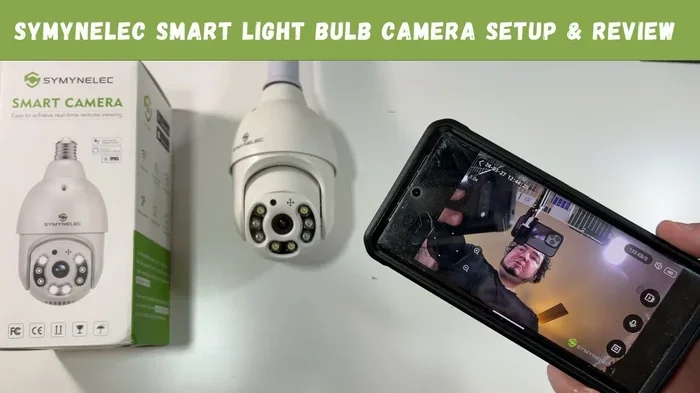
Light bulb cameras have become one of the coolest gadgets in the smart home world. They look like regular light bulbs, but they hide a fully functioning security camera inside. You can place them in any standard lamp socket and suddenly have eyes on your room.
But here is the big question most people ask before buying one. Do you need WiFi for a light bulb camera to work? The short answer is yes, in most cases. But the full story is a bit more interesting than that. Let us break it all down so you know exactly what to expect before you set one up in your home.
A light bulb security camera is a clever little device that combines illumination with surveillance. It fits right into your existing light fixtures and records video or captures motion events. Some models stream live footage to your phone. Others store clips on a memory card or in the cloud. The features depend heavily on whether the camera has a wireless connection or not.
Key Takeaways
- WiFi is essential for real-time monitoring: Without WiFi, you lose remote viewing and live streaming on most light bulb cameras.
- Some models offer local storage: Certain light bulb cameras can record to an SD card even without an active WiFi connection.
- WiFi range matters a lot: If your camera is too far from the router, you may need to extend your WiFi range for a stable connection.
- Too many devices can cause issues: Adding a camera to a crowded network may slow things down, especially if you already have many smart devices.
- Setup is usually simple: Most WiFi light bulb cameras take less than 15 minutes to install and connect through a mobile app.
- Mesh networks help with coverage: If your home has dead zones, consider adding mesh to your existing router for better camera placement.
📑 Table of Contents
- What Exactly Is a Light Bulb Camera?
- Do You Need WiFi for a Light Bulb Camera?
- How Does a WiFi Light Bulb Camera Work?
- What Happens When a Light Bulb Camera Has No WiFi?
- Can Too Many Devices Slow Down Your Camera?
- Setting Up Your Light Bulb Camera: A Step-by-Step Guide
- Common Mistakes People Make with Light Bulb Cameras
- Light Bulb Camera vs. Traditional Security Camera
- Can You Use a Light Bulb Camera Without WiFi at All?
- Final Thoughts on WiFi and Light Bulb Cameras
What Exactly Is a Light Bulb Camera?
A light bulb camera is exactly what it sounds like. It is a working light bulb with a tiny camera built into the base or the bulb itself. You screw it into any standard lamp socket just like a regular bulb. Then you can monitor the room from anywhere using a mobile app.
These cameras come in different shapes and sizes. Some look like classic Edison bulbs. Others are more modern and sleek. The camera lens is usually hidden near the base where the bulb screws in. This makes them almost invisible to anyone walking by.
Most light bulb security cameras offer features like night vision, motion detection, two-way audio, and cloud or local storage. The quality of these features depends a lot on your WiFi connection and the specific model you choose.
Do You Need WiFi for a Light Bulb Camera?
This is the most important question, and the answer depends on what you want the camera to do. Let us look at the different scenarios.
Full WiFi Connection: What You Get
When your WiFi enabled light bulb camera is connected to a wireless network, you get the full experience. You can view live video from your phone, receive instant motion alerts, and stream high-quality footage. Most apps also let you talk through the camera using two-way audio.
With WiFi, your camera can upload clips to the cloud. This means your recordings stay safe even if someone takes the bulb out of the socket. You can also share access with family members or neighbors through the app.
A strong WiFi connection also means smoother video. You get fewer lags and better image quality. If you want the most out of your wireless camera, a solid WiFi signal is non-negotiable.
No WiFi: What Happens Then?
Without WiFi, a light bulb camera loses most of its smart features. You cannot view live footage on your phone. You will not get push notifications when motion is detected. Cloud storage becomes impossible.
However, some models still work in a limited way. Certain light bulb cameras can record to a local SD card even without a wireless connection. The camera captures footage and stores it on the card inside the bulb. You then remove the card and plug it into a computer to review the clips.
This offline mode is not ideal for real-time monitoring. But it does work for basic recording. Think of it as a security camera that only saves evidence after something happens.
How Does a WiFi Light Bulb Camera Work?
Understanding how a wireless security camera works inside a light bulb helps you troubleshoot problems later. The process is simpler than you might think.
First, the camera connects to your home WiFi network during setup. You usually do this through a companion app on your phone. The app walks you through pairing the bulb with your network. Once connected, the camera streams video data over your wireless network to the cloud or a local server.
When motion is detected, the camera wakes up and starts recording. It sends a notification to your phone through the internet. You can then open the app and watch the live feed or review saved clips.
The camera also needs power to work. Since it is a light bulb, it gets its power from the lamp socket. This means the camera is always on as long as the switch is flipped on. No batteries to charge. No wires to hide.
The Role of Your WiFi Router
Your WiFi router is the brain behind the whole setup. It sends and receives data between the camera and the internet. If your router is far from the lamp where the camera sits, the signal might be weak.
Weak signals mean dropped connections and poor video quality. If you have dead zones in your home, you might want to add mesh to your existing router to boost coverage. A mesh system spreads WiFi evenly throughout your home so every room gets a strong signal.
What Happens When a Light Bulb Camera Has No WiFi?
Let us be clear about what you lose when there is no WiFi. A light bulb camera without WiFi is essentially a dumb recording device. It cannot send alerts, stream live video, or connect to your phone remotely.
Here is a quick look at what changes without a wireless connection:
- No live streaming: You cannot watch what is happening in the room from your phone.
- No instant alerts: Motion detection still works locally, but you will not get notifications.
- No cloud storage: Recordings cannot upload to the internet for safekeeping.
- No two-way audio: You cannot speak through the camera or listen in real time.
- Limited playback: Only local storage options like SD cards remain available.
So while a camera can technically work without WiFi, you are getting a fraction of its value. If you want real home monitoring, a wireless connection is a must.
Can Too Many Devices Slow Down Your Camera?
Your home WiFi network has a limit. Every device connected to it shares the available bandwidth. If you have a smart TV, a phone, a laptop, a tablet, and a smart speaker all running at once, your network gets crowded.
Adding a light bulb security camera to an already busy network can cause problems. You might notice lag in the live feed or delayed motion alerts. In some cases, the camera might even disconnect and reconnect frequently.
Too many devices can slow down WiFi, and a camera is no exception. If you notice performance issues, try disconnecting devices you are not using. You can also set your camera to a separate frequency band if your router supports dual-band WiFi.
Quick Tips to Keep Your Camera Running Smoothly
- Use the 5GHz band: It is faster and less crowded than the 2.4GHz band. Check your router settings to switch.
- Keep the camera close to the router: Walls and floors weaken WiFi signals over distance.
- Limit other streaming: Avoid heavy downloads or 4K streaming while using the camera feed.
- Restart your router regularly: A simple reboot can fix slow speeds and connection drops.
- Update the camera firmware: Manufacturers often release updates that improve performance and fix bugs.
Setting Up Your Light Bulb Camera: A Step-by-Step Guide
Setting up a WiFi for light bulb camera system is easier than most people think. You do not need to be tech-savvy. Here is how to do it step by step.
Step 1: Choose the Right Bulb
Before you buy anything, decide what you need. Do you want a camera with night vision? Two-way audio? Cloud storage? Make a list of must-have features. Then compare models and read reviews. Pick a bulb that fits your lamp socket size, whether it is a standard E26 or E27 base.
Step 2: Screw It In and Power It On
Screw the camera bulb into your lamp socket just like any other bulb. Make sure the lamp is turned on so the camera gets power. Wait for the bulb to power up. Most models have a small LED indicator that blinks to show they are ready for setup.
Step 3: Download the App
Every light bulb security camera comes with a companion app. Search for the manufacturer’s app in the App Store or Google Play. Install it on your phone and create an account if required.
Step 4: Connect to WiFi
Open the app and follow the on-screen instructions. The app will ask you to connect the bulb to your WiFi network. Make sure you are using the correct password. Once connected, the blinking LED should stop, and the app will show a live feed from the camera.
Step 5: Adjust Settings and Test
Now that the camera is online, go through the settings. Set up motion detection zones. Choose where to store your footage. Test the two-way audio. Make sure the night vision works by covering the sensor or turning off the lights.
If the signal is weak, you might need to boost your WiFi at home. A simple WiFi extender or mesh node placed closer to the lamp can solve the problem quickly.
Common Mistakes People Make with Light Bulb Cameras
Even with a simple setup, people make mistakes that cause frustration. Here are the most common ones and how to avoid them.
Placing the Bulb in the Wrong Location
Not every lamp socket gives you the best view. If you place the camera bulb too high, you might only capture the ceiling. If you place it too low, people can easily spot it. Pick a lamp that sits at eye level or just above for the best coverage.
Ignoring WiFi Strength
A weak WiFi signal causes dropped footage and poor video quality. Do not put your camera in a room with poor connectivity without fixing it first. Use a wired connection to extend your WiFi range if needed, or move the lamp closer to the router.
Forgetting to Update the App
Manufacturers regularly push updates that fix bugs and add features. If your app is outdated, you might miss new capabilities or run into connection issues. Keep your app updated and check for firmware updates for the camera itself.
Overlooking Privacy Concerns
A camera in your home raises privacy questions. Make sure you use strong passwords for your WiFi and the camera app. Enable two-factor authentication if available. Only share camera access with people you trust.
Light Bulb Camera vs. Traditional Security Camera
How does a light bulb security camera compare to a traditional wireless security camera? Let us look at the key differences.
| Feature | Light Bulb Camera | Traditional Security Camera |
|---|---|---|
| Visibility | Disguised as a regular bulb | Clearly visible as a camera |
| Installation | Screw into any lamp socket | Mounting required, drilling often needed |
| Power Source | Lamp socket power | Battery, wired, or PoE |
| WiFi Required | Yes, for full features | Yes, for most smart features |
| Portability | Very easy to move between rooms | Fixed installation, harder to relocate |
| Video Quality | Good, varies by model | Usually higher, especially in pro models |
| Price | Affordable, often under $50 | Widely varies, $30 to $200+ |
Both types of cameras need WiFi for their best features. But the light bulb camera wins on discretion and ease of installation. You do not need tools or mounting hardware. Just screw it in and go.
Can You Use a Light Bulb Camera Without WiFi at All?
Some people live in areas with poor internet or prefer not to use WiFi for privacy reasons. Can a light bulb camera work without any wireless connection at all?
The honest answer is: it depends on the model. A few cameras on the market offer local-only recording with an SD card. These do not need WiFi to capture video. But you lose all smart features like remote viewing, alerts, and two-way audio.
If you want a camera that works fully offline, a traditional wired security camera might be a better fit. Some wired cameras can record to a local DVR without any internet connection. But they are bulkier and harder to install than a simple bulb.
For most people, WiFi is a necessary part of the experience. It unlocks the real value of having a hidden camera that you can check from anywhere. If your home WiFi is weak, consider boosting your WiFi at home before installing the camera.
Final Thoughts on WiFi and Light Bulb Cameras
A WiFi for light bulb camera setup is one of the smartest ways to add security to your home without making it look like a surveillance operation. The camera blends in perfectly with your existing decor and gives you real-time monitoring right on your phone.
Yes, you need WiFi to get the most out of these devices. Without it, you are stuck with basic local recording and none of the smart features that make these cameras so useful. But with a solid WiFi connection, a light bulb camera becomes a powerful and discreet home security tool.
Make sure your WiFi is strong where you place the camera. Avoid overcrowding your network with too many devices. Keep your app and firmware updated. And most importantly, enjoy the peace of mind that comes from knowing you can check on your home anytime, anywhere.
A light bulb security camera is a small investment that pays off in safety and convenience. Just make sure your wireless connection is ready to support it, and you will be set up for success.
Frequently Asked Questions
Can a light bulb camera work without WiFi?
Some models can record to a local SD card without WiFi, but you lose remote viewing, live streaming, and motion alerts. For the full experience, a WiFi connection is necessary.
How far should the light bulb camera be from the router?
Try to keep the camera within 30 feet of your router for the best signal. Thick walls and floors can weaken the connection. If the camera is too far, consider using a WiFi extender or mesh system.
Do light bulb cameras use a lot of WiFi data?
They use a moderate amount of data, especially if you stream live video or store clips in the cloud. A typical camera uses about 1 to 2 GB of data per month. If you have limited data, adjust the video quality settings in the app.
Can I use a light bulb camera outdoors?
Most light bulb cameras are designed for indoor use only. They are not weatherproof. If you want an outdoor hidden camera, look for models specifically rated for outdoor installation.
Do I need a special app to control the light bulb camera?
Yes, every light bulb camera comes with a manufacturer-specific app. You download it on your phone, connect the bulb to your WiFi through the app, and control all features from there.
Is a light bulb camera a good choice for apartment renters?
Absolutely. Light bulb cameras are perfect for renters because they require no drilling or permanent installation. You can screw one into any lamp socket and remove it when you move out.