Can Siri Turn On Your Coffee Maker Without Lifting A Finger
Yes, Siri can turn on your coffee maker if you use the right smart home setup. With Apple HomeKit, smart plugs, or compatible coffee machines, you can start your morning brew using just your voice. This guide covers everything you need to know about Siri smart home coffee control, from setup to troubleshooting.
Key Takeaways
- Siri can control your coffee maker: Using HomeKit, smart plugs, or compatible devices, Siri can start brewing with a simple voice command.
- HomeKit-compatible coffee makers work best: Brands like Breville, Smarter, and Brava offer native Siri integration for seamless control.
- Smart plugs are a budget-friendly option: You don’t need a new coffee maker to add Siri voice control to your existing machine.
- Siri Shortcuts unlock advanced automation: Create custom routines that brew coffee at specific times or trigger multiple smart home actions together.
- Setup is simple but requires the right gear: A HomePod, iPhone, and a compatible device or smart plug are all you need to get started.
- Common issues are easy to fix: Most problems with Siri coffee control come from Wi-Fi connectivity or device compatibility, not the setup itself.
📑 Table of Contents
- Can Siri Turn On Your Coffee Maker Without Lifting A Finger
- How Siri Controls Smart Home Devices
- Which Coffee Makers Work With Siri
- Setting Up Siri to Control Your Coffee Maker
- Creating Siri Shortcuts for Your Morning Routine
- Siri vs Alexa and Google Assistant for Coffee Control
- Common Problems and How to Fix Them
- Tips to Get the Most Out of Siri Coffee Control
- The Future of Smart Coffee Makers and Voice Assistants
- Final Thoughts
Can Siri Turn On Your Coffee Maker Without Lifting A Finger
Imagine waking up and saying “Hey Siri, turn on the coffee maker.” Within minutes, your kitchen fills with the rich aroma of fresh coffee. You didn’t press a single button. You didn’t even leave your bed.
This is not a scene from a sci-fi movie. It is real, and it works today. Siri can turn on your coffee maker if you set things up the right way. Whether you have a smart coffee machine or a regular one with a smart plug, Apple’s voice assistant can handle the job.
In this guide, we will walk through every step. You will learn which coffee makers work with Siri, how to set up smart plugs, and how to create automated morning routines. By the end, you will know exactly how to make hands-free coffee brewing part of your daily life.
The smart home space has grown fast in recent years. More devices connect to Apple HomeKit every month. Coffee makers are no exception. Brands are building voice-controlled coffee makers that respond to Siri commands directly. And even if your current machine is not “smart,” there is almost always a way to make it work.
Let us dive in and explore how this all works.
How Siri Controls Smart Home Devices
Before we get into coffee makers specifically, it helps to understand the bigger picture. Siri is Apple’s voice assistant. It lives inside iPhones, iPads, Macs, HomePods, and Apple Watches. When you pair Siri with the Apple HomeKit framework, it gains the power to control compatible smart home devices.
HomeKit acts as a bridge. It connects Siri to your smart devices. Think of HomeKit as the language Siri uses to talk to your gadgets. Without HomeKit, Siri cannot reach most smart home products.
Here is how the process works in simple terms:
- You give a voice command to Siri.
- Siri sends that command through your home Wi-Fi network.
- The command reaches the target device through HomeKit.
- The device performs the action, like turning on or off.
This home automation flow happens in seconds. You do not need to open any apps. You do not need to tap your phone. Just speak, and Siri does the rest.
Not all smart home devices support HomeKit, though. Apple maintains a list of certified products. These products carry the “Works with Apple HomeKit” badge. If you want Siri integration for your coffee maker, look for this badge when shopping.
Why Voice Control Matters in the Kitchen
The kitchen is one of the most important rooms in any home. It is where we start our mornings. Voice control makes the kitchen more accessible and convenient. You can multitask while Siri handles your appliances.
For people with mobility challenges, voice assistant technology is a game changer. Turning on a coffee maker without getting up or reaching for a switch can make a real difference in daily independence.
Which Coffee Makers Work With Siri
Not every coffee maker can connect to Siri. The ones that can fall into two main categories: native HomeKit devices and machines that work through smart plugs. Let us look at both.
Native HomeKit Coffee Makers
These coffee makers have built-in Wi-Fi and HomeKit support. They connect directly to your Apple ecosystem without any extra hardware.
Some popular options include:
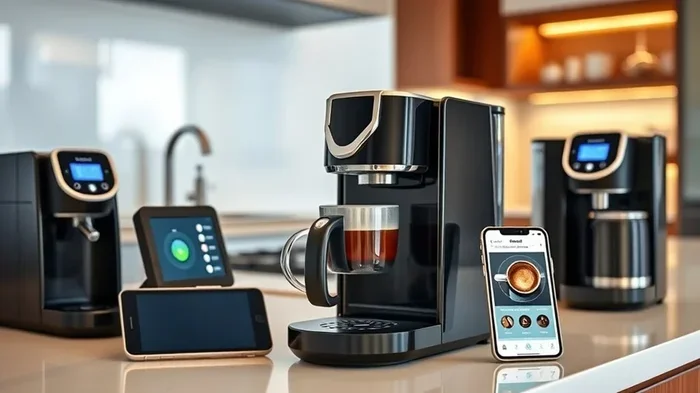
- Smarter Coffee Maker: This machine works directly with the Home app. You can start brewing with a Siri voice command or schedule it from your iPhone.
- Breville Oracle Touch: A premium espresso machine with HomeKit connectivity. It is expensive but offers full smart kitchen device integration.
- Brava Smart Oven: While not a traditional coffee maker, the Brava can brew coffee and works beautifully with Siri.
- Miele Coffee Machines: Select Miele models support HomeKit. These are high-end machines designed for serious coffee lovers.
Native HomeKit coffee makers offer the smoothest experience. You set them up in the Home app, assign a room, and Siri can find them instantly.
Using Smart Plugs With Regular Coffee Makers
What if your current coffee maker does not have smart features? No problem. A smart plug can add Siri voice control to almost any machine.
A smart plug sits between your coffee maker and the wall outlet. It acts as a remote switch. When Siri sends a signal, the smart plug powers on or off your coffee maker.
Popular smart plug options that work with HomeKit include:
- Eve Energy Plug: A reliable HomeKit-compatible plug. It is compact and works well with Siri.
- LIFX Mini Smart Plug: Another solid choice. It connects through Wi-Fi and supports HomeKit automation.
- Apple HomePod Mini as a Hub: You can also use the HomePod Mini to control non-HomeKit smart plugs through the Home app.
The trade-off with smart plugs is that they simply turn the power on or off. They do not know when the coffee is done brewing. You will need to time it yourself or set a schedule.
Setting Up Siri to Control Your Coffee Maker
Setting up Siri coffee maker control is easier than most people think. The process takes about 10 to 15 minutes. Here is a step-by-step walkthrough.
Step 1: Check Your Setup
Before you begin, make sure you have the right equipment:
- An iPhone or iPad running the latest iOS.
- A HomePod or Apple TV (these act as a HomeKit hub for remote control).
- A HomeKit-compatible coffee maker or a smart plug.
- A stable Wi-Fi connection.
Without a HomeKit hub, you can still control devices nearby. But a hub lets you manage your coffee maker from anywhere, even when you are not home.
Step 2: Add Your Device to the Home App
Open the Home app on your iPhone. Tap the plus icon in the top right corner. Choose “Add Accessory.” Follow the on-screen instructions to pair your coffee maker or smart plug.
Once the device appears in the Home app, you can rename it. Give it a clear name like “Coffee Maker” or “Morning Coffee.” This makes voice commands easy to remember.
Step 3: Assign It to a Room
In the Home app, assign your coffee maker to the Kitchen room. This helps Siri understand context. When you say “Turn on the coffee maker in the kitchen,” Siri knows exactly which device you mean.
Step 4: Test a Simple Voice Command
Now try it out. Say “Hey Siri, turn on the coffee maker.” Wait a few seconds. You should hear the machine power on. If it works, you are good to go.
If it does not work, check your Wi-Fi connection. Make sure the device is online in the Home app. Sometimes a quick restart of your router fixes the issue.
Creating Siri Shortcuts for Your Morning Routine
Basic on-off commands are great. But Siri Shortcuts take things to the next level. Shortcuts let you bundle multiple actions into a single voice command.
For example, you can create a shortcut called “Good Morning” that:
- Turns on the coffee maker.
- Starts playing your favorite playlist.
- Turns on the kitchen lights.
- Reads out your calendar for the day.
All of this happens when you say one phrase. That is the power of smart home automation.
To create a shortcut, open the Shortcuts app on your iPhone. Tap the plus icon. Add your desired actions. Then assign a phrase like “Good morning” to trigger the whole sequence.
Scheduling Coffee Brew Times
You can also set up automated coffee brewing schedules in the Home app. Go to the Automation tab and create a new automation. Choose “Time of Day” and set it to your preferred wake-up time.
Add your coffee maker as the action. Save the automation, and Siri will turn on the machine every morning at the same time. This is perfect for people who want fresh coffee waiting when their alarm goes off.
Using Geofencing for Smart Coffee Brewing
Here is a cool trick. You can set up an automation that triggers when you leave work. Your coffee maker turns on, so a fresh pot is ready when you walk through the door.
This uses your iPhone’s location services. When your phone detects you are near home, it triggers the coffee maker. It feels like magic, but it is just IoT coffee machine technology at work.
Siri vs Alexa and Google Assistant for Coffee Control
Siri is not the only voice assistant that can control coffee makers. Alexa and Google Assistant also support smart coffee machines. So how does Siri compare?
| Feature | Siri (Apple HomeKit) | Alexa (Amazon) | Google Assistant |
|---|---|---|---|
| Native HomeKit Support | Yes | No | No |
| Smart Plug Compatibility | Yes | Yes | Yes |
| Voice Recognition Accuracy | High | High | High |
| Privacy Focus | Strong | Moderate | Moderate |
| Ecosystem Integration | Apple devices only | Broad third-party support | Broad third-party support |
| Automation Options | Strong (Shortcuts + Home) | Strong (Routines) | Strong (Routines) |
Siri shines when you are already in the Apple ecosystem. If you use an iPhone, Apple Watch, and HomePod, Siri smart home coffee control feels seamless. Alexa and Google have wider device compatibility, but Siri offers a more private and tightly integrated experience.
Common Problems and How to Fix Them
Even with the best setup, you might run into issues. Here are the most common problems and their solutions.
Siri Does Not Recognize the Coffee Maker
This usually happens when the device is not added to the Home app correctly. Go back to the Home app and check if the coffee maker appears. If not, remove it and re-add it. Make sure both your iPhone and the coffee maker are on the same Wi-Fi network.
The Coffee Maker Turns On but Does Not Brew
If you are using a smart plug, the plug only controls power. It does not start the brewing cycle on its own. You may need to press the brew button on the machine first or use a machine that starts brewing automatically when powered on.
Siri Commands Work Slowly
Slow response times often come from a weak Wi-Fi signal. Move your router closer to the kitchen or invest in a Wi-Fi extender. A home automation setup works best on a strong, stable network.
Siri Does Not Respond at All
Check if “Hey Siri” is enabled on your device. Go to Settings, then Siri & Search, and make sure all the toggles are on. Also ensure your device is not on Do Not Disturb mode, which can block Siri commands.
Tips to Get the Most Out of Siri Coffee Control
Want to level up your voice-controlled coffee brewing setup? Here are some practical tips.
- Name your device clearly. Call it “Coffee Maker” or “Morning Coffee” so Siri understands you easily.
- Use a HomeKit hub. A HomePod or Apple TV lets you control your coffee maker from anywhere, not just at home.
- Create a morning shortcut. Bundle coffee brewing with other tasks for a seamless wake-up routine.
- Keep your firmware updated. Both your coffee maker and smart plug should run the latest firmware for the best performance.
- Set up a schedule. Automate brewing times so coffee is always ready when you need it.
- Test your setup regularly. A quick test every few days keeps everything running smoothly.
The Future of Smart Coffee Makers and Voice Assistants
The connected appliances market is growing fast. More coffee makers are shipping with built-in Wi-Fi and voice assistant support. In the near future, we can expect even deeper integration between Siri and coffee machines.
Imagine telling Siri not just to turn on the machine, but to brew a specific type of coffee. “Hey Siri, make a strong espresso.” The technology is moving in that direction.
Apple has also been expanding HomeKit support to more appliance categories. As more brands join the HomeKit ecosystem, smart kitchen devices will become even more powerful and easier to control.
For now, the current setup works well. Whether you use a native HomeKit coffee maker or a smart plug with a regular machine, Siri gives you hands-free control that makes mornings smoother and more enjoyable.
Final Thoughts
Can Siri turn on your coffee maker? Absolutely yes. With the right setup, you can start your morning brew using nothing but your voice. Whether you choose a native HomeKit coffee maker or add a smart plug to your existing machine, the result is the same: hands-free coffee brewing that fits right into your daily routine.
The setup process is straightforward. You do not need to be a tech expert. A few simple steps, and you are brewing coffee from across the room or even before you get out of bed.
Take the time to explore Siri smart home coffee control today. Your mornings will never be the same. Once you experience the convenience of voice-activated coffee, you will wonder how you ever lived without it.
Start small. Try a smart plug first if you are not ready to buy a new machine. See how it feels. Then decide if you want to invest in a full smart kitchen device setup. Either way, you are taking a step toward a more connected, more convenient home.
Frequently Asked Questions
Can Siri turn on any coffee maker?
Siri can turn on coffee makers that are either native HomeKit devices or connected through a HomeKit-compatible smart plug. Regular coffee makers without any smart connection cannot be controlled by Siri directly. A smart plug bridges that gap by adding wireless control to any machine.
Do I need a HomePod to control my coffee maker with Siri?
A HomePod is not strictly required, but it is highly recommended. A HomePod acts as a HomeKit hub, which allows you to control your coffee maker remotely and set up automations. Without a hub, you can only control the coffee maker when you are on the same Wi-Fi network at home.
Is it safe to leave a smart plug connected to a coffee maker overnight?
Yes, it is generally safe. Most smart plugs are designed with built-in safety features like overcurrent protection and overheating prevention. However, it is always a good idea to check the manufacturer’s guidelines and never leave any appliance unattended for extended periods.
Can I schedule my coffee maker to brew at a specific time using Siri?
Yes, you can. Through the Home app, you can create an automation that triggers your coffee maker at a specific time each day. You can also use Siri Shortcuts to set up more complex scheduling and routines for your morning brew.
Which smart plug works best with Siri for coffee makers?
The Eve Energy Plug and LIFX Mini Smart Plug are two of the best options for HomeKit users. Both are reliable, compact, and support Siri voice commands directly. They work well with standard coffee makers and are easy to set up in the Home app.
Can Siri control multiple coffee makers in different rooms?
Yes, Siri can control multiple coffee makers as long as each one is added to the Home app and assigned to the correct room. You can give each machine a unique name and use room-specific commands like “Turn on the coffee maker in the kitchen” or “Start the coffee in the office.”